×
‹
›

Here is exactly what the user sees and what happens at each step. These are live screenshots from Robert's account (Mark Pederson populated the contact and meeting data used here).
Three-panel layout: sidebar (left), canvas (center), context panel (right)
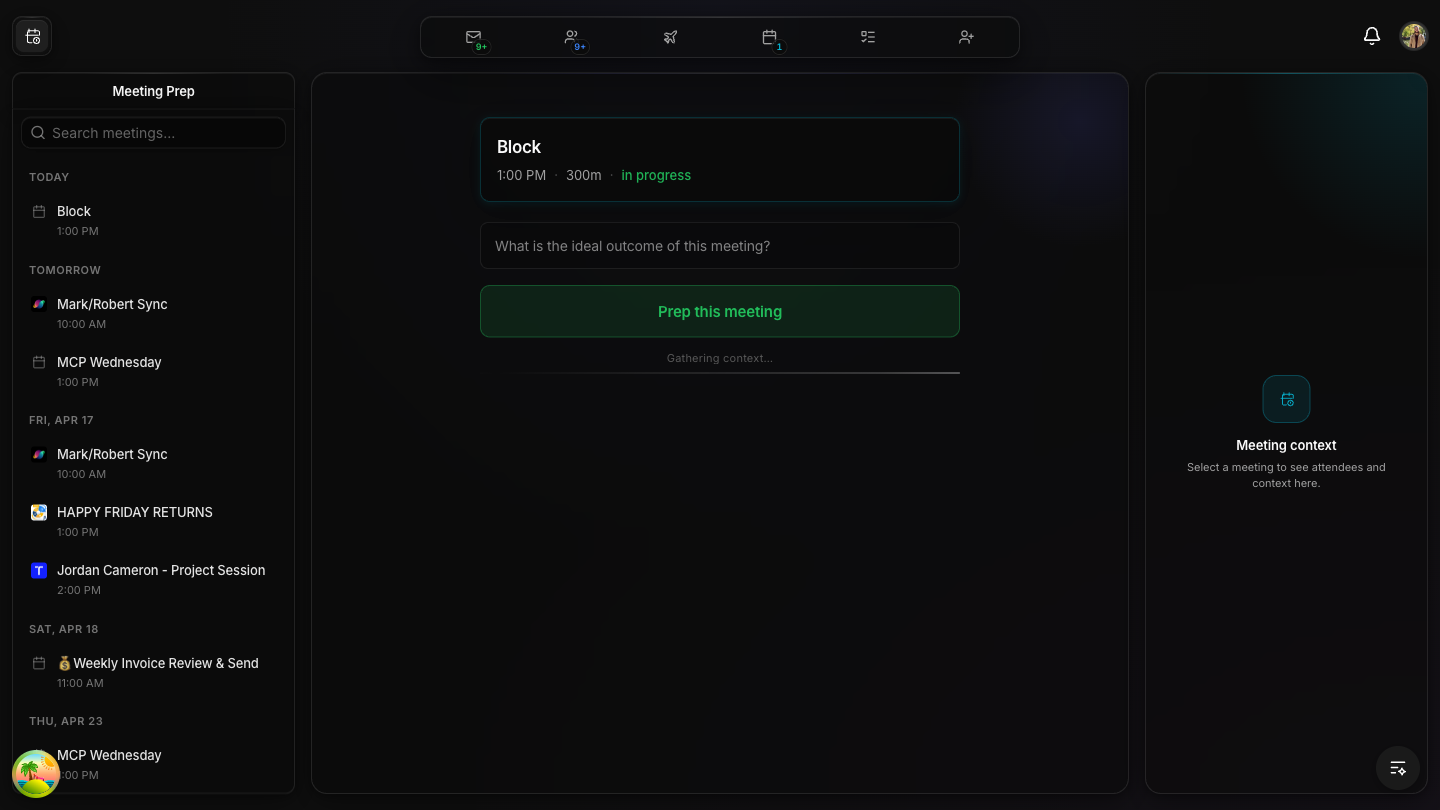
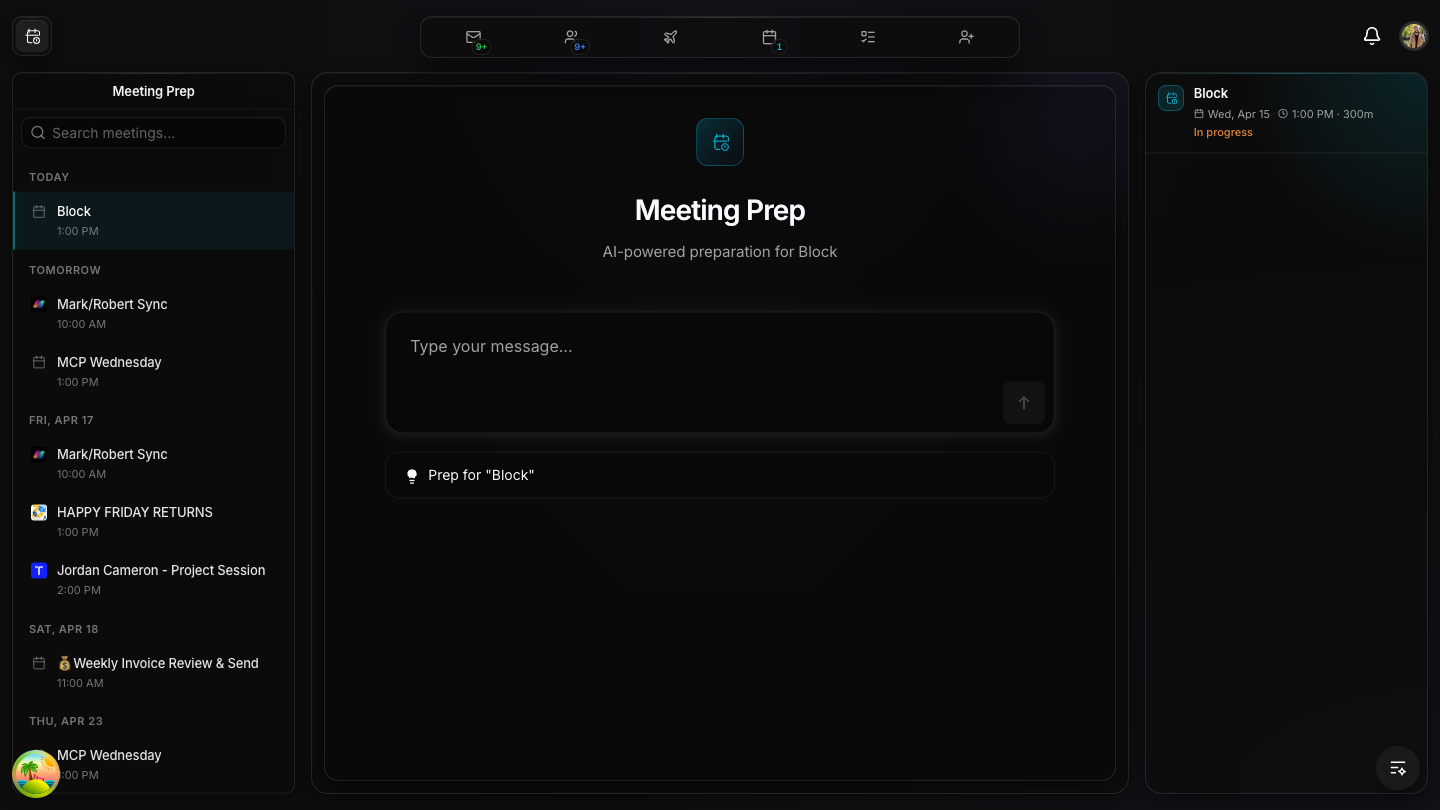
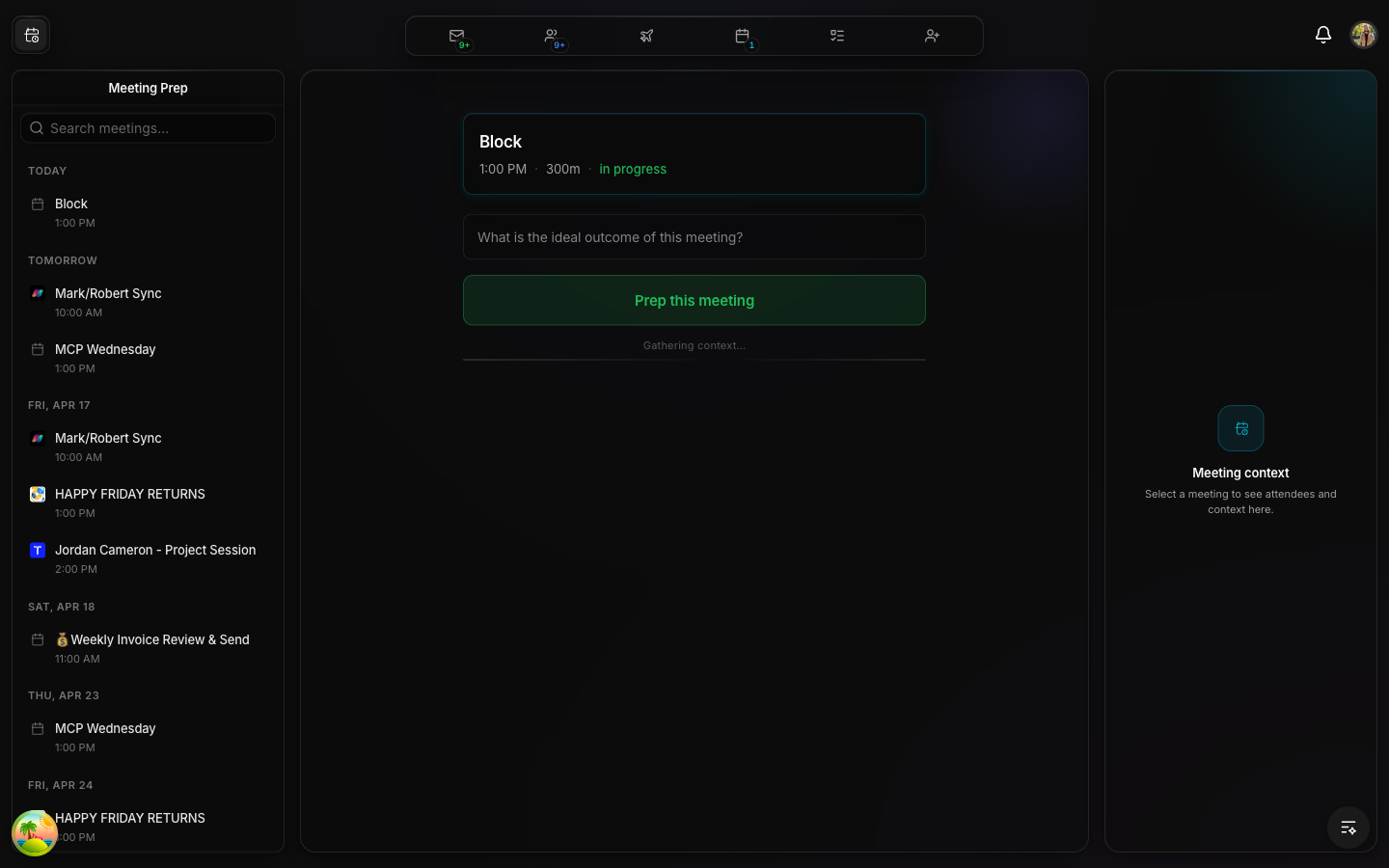
When you open Meeting Prep (/network?active-view=meeting-prep), the canvas shows today's meetings as rich cards. The sidebar shows all upcoming meetings grouped by day (Today, Tomorrow, Fri Apr 17, etc.). Each sidebar item shows the first participating company's logo. The right panel is empty until you select a meeting.
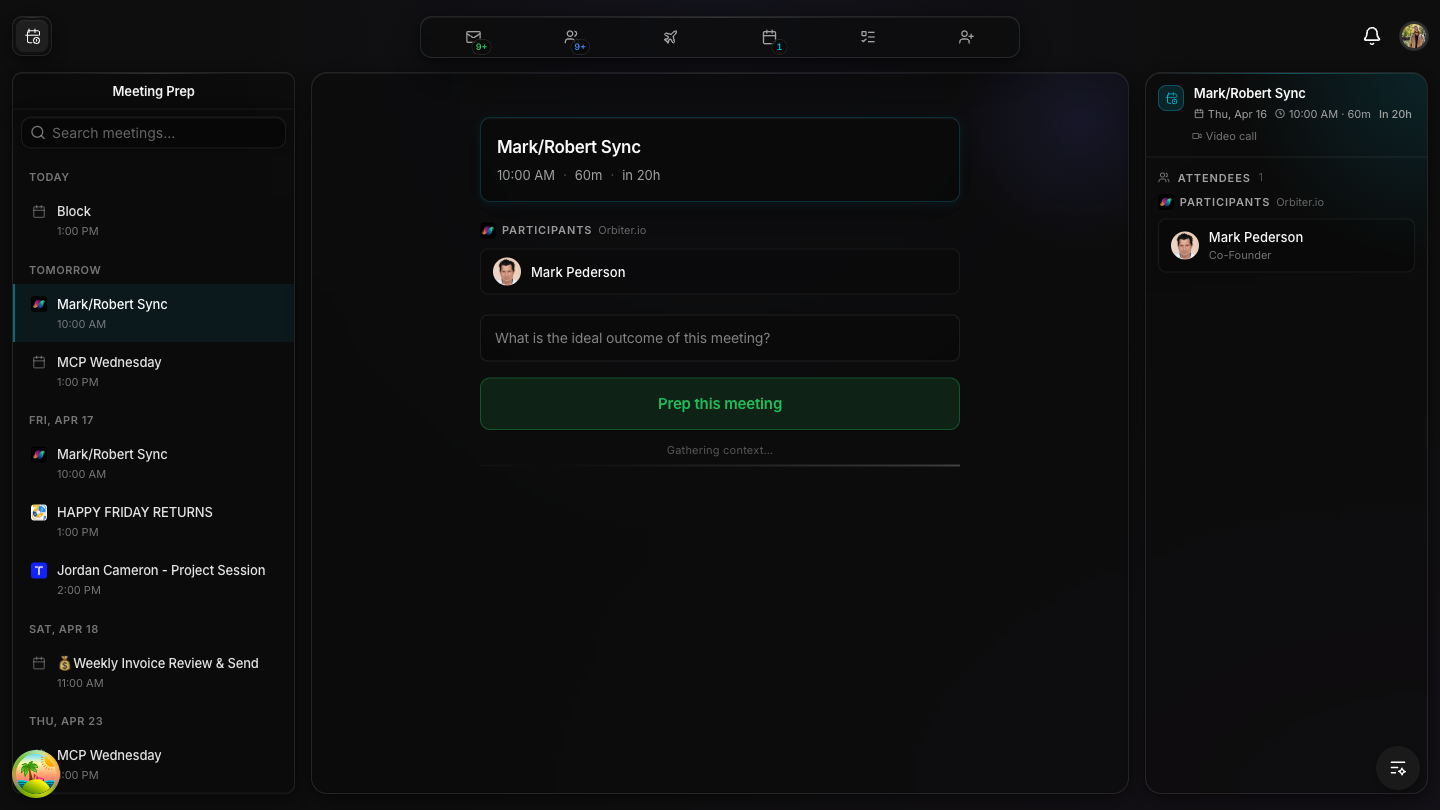
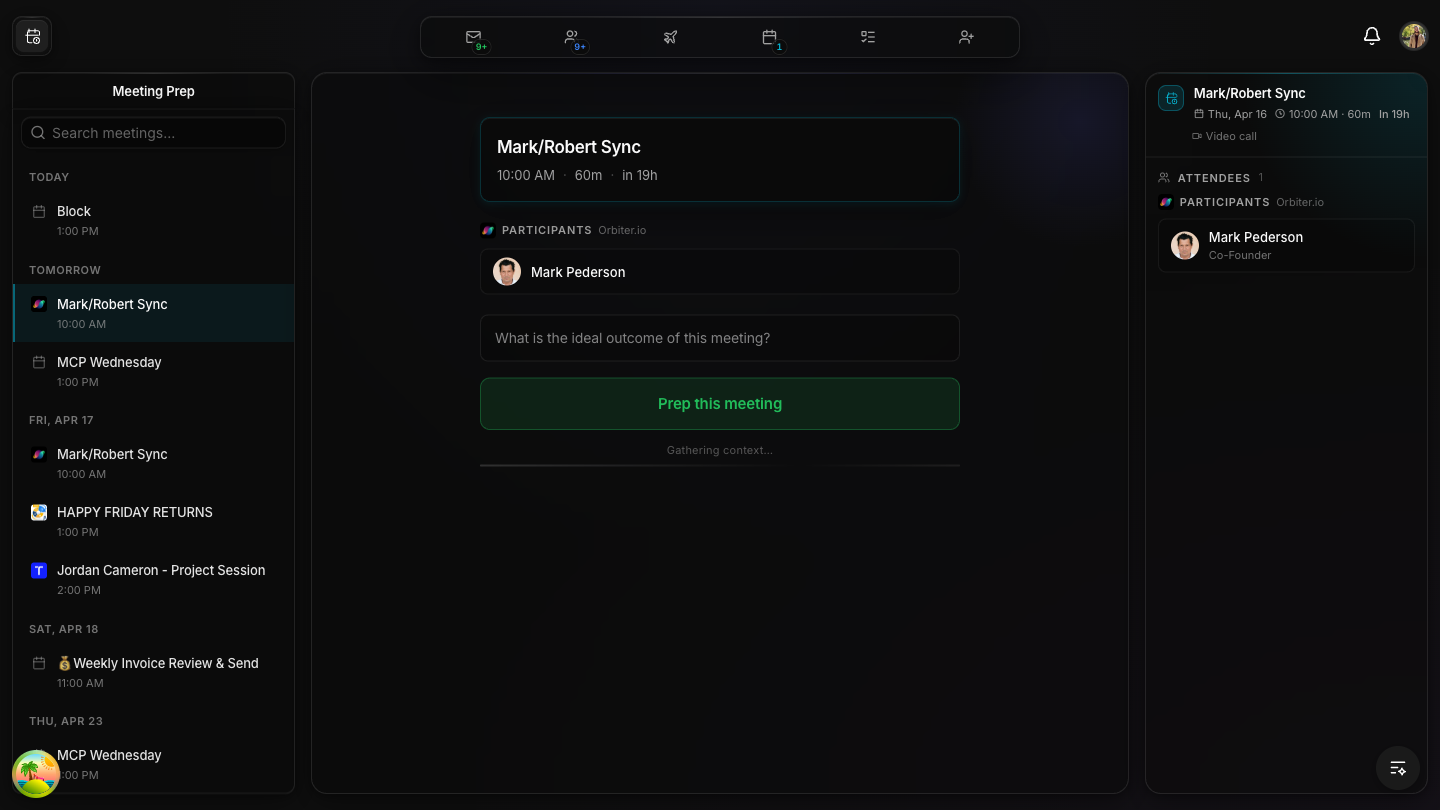
Mark/Robert Sync selected — canvas shows prep card, right panel shows classified attendees
Clicking a sidebar meeting shows a MeetingCard on the canvas with:
The right context panel shows: meeting title, date, time, duration, video call indicator, and the full classified attendee list with titles.
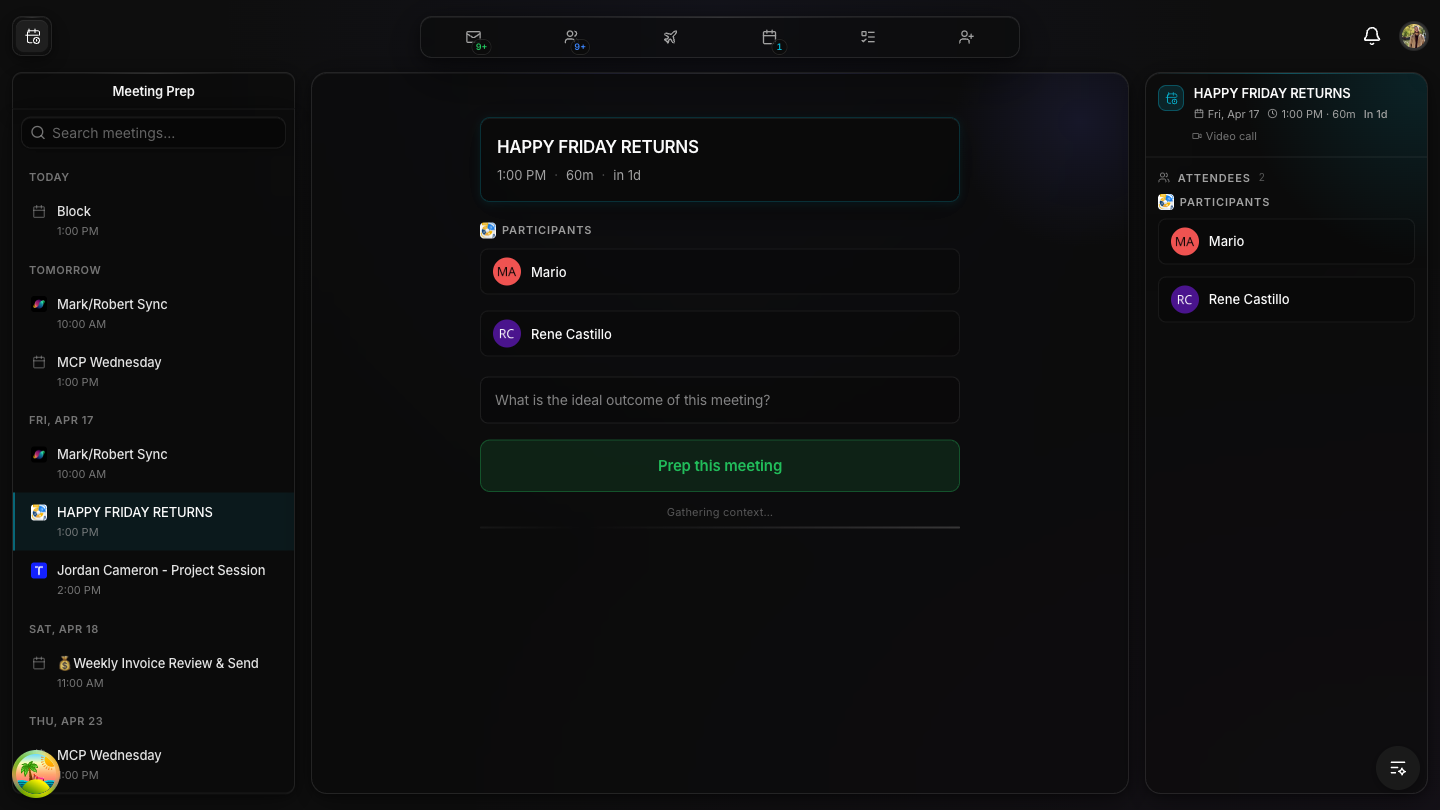
HAPPY FRIDAY RETURNS — showing external participants Mario and Rene Castillo
Meetings with multiple external participants are classified into groups. Here, Mario and Rene Castillo show under the "PARTICIPANTS" section. The backend classify-participants function sorts these by company domain — same domain = grouped under one company logo.
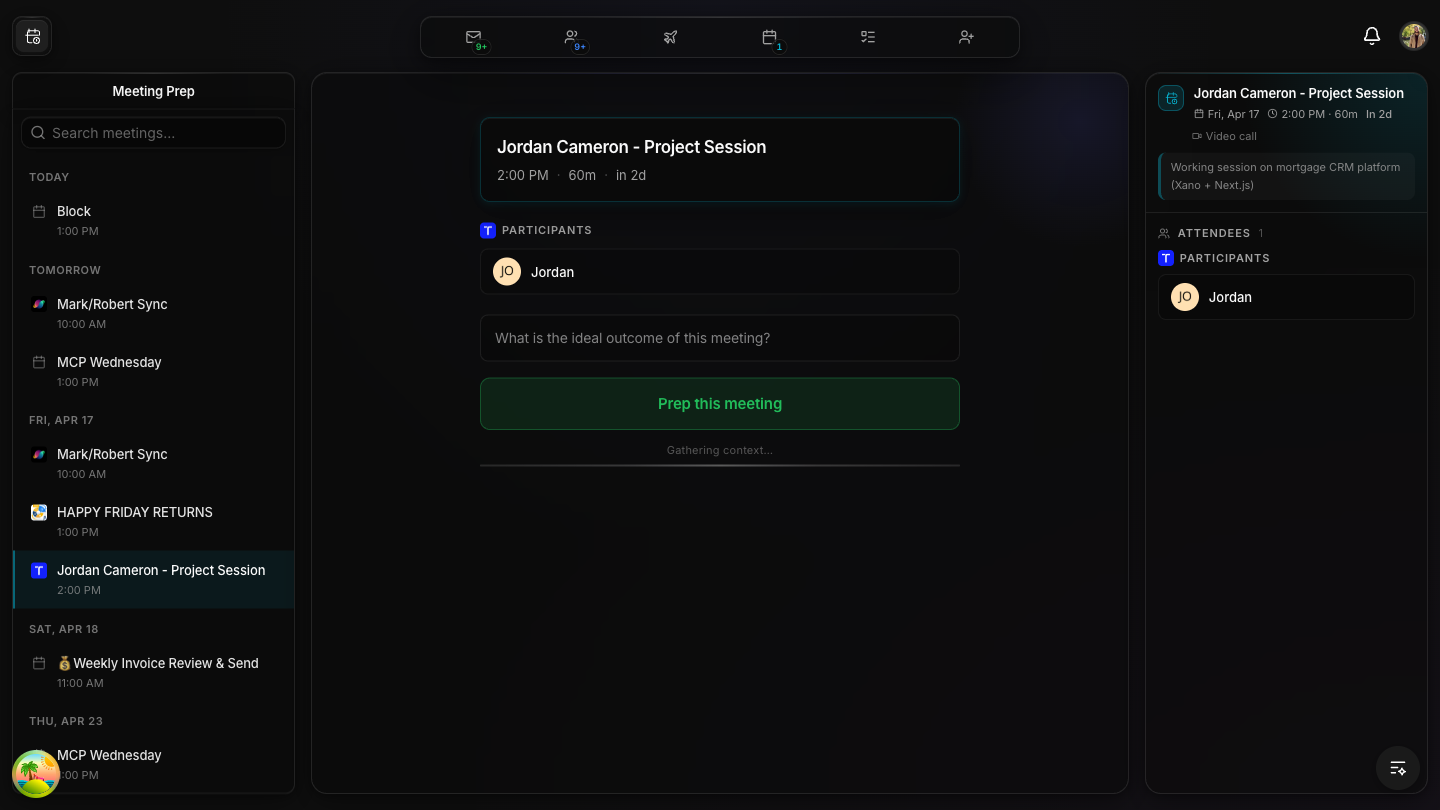
Jordan Cameron - Project Session — right panel shows meeting description
When a meeting has a description, it appears in the context panel below the attendees. Here: "Working session on mortgage CRM platform (Xano + Next.js)". This description is also included in the enriched prompt sent to the AI.
After clicking "Prep this meeting" — CrayonChat loads with conversation starter
Clicking the green button flips prepStarted to true. The canvas switches from the MeetingCard to CrayonChat — a full SSE-streaming AI chat interface. The conversation starter button (Prep for "Block") contains a rich auto-generated prompt with all meeting context.
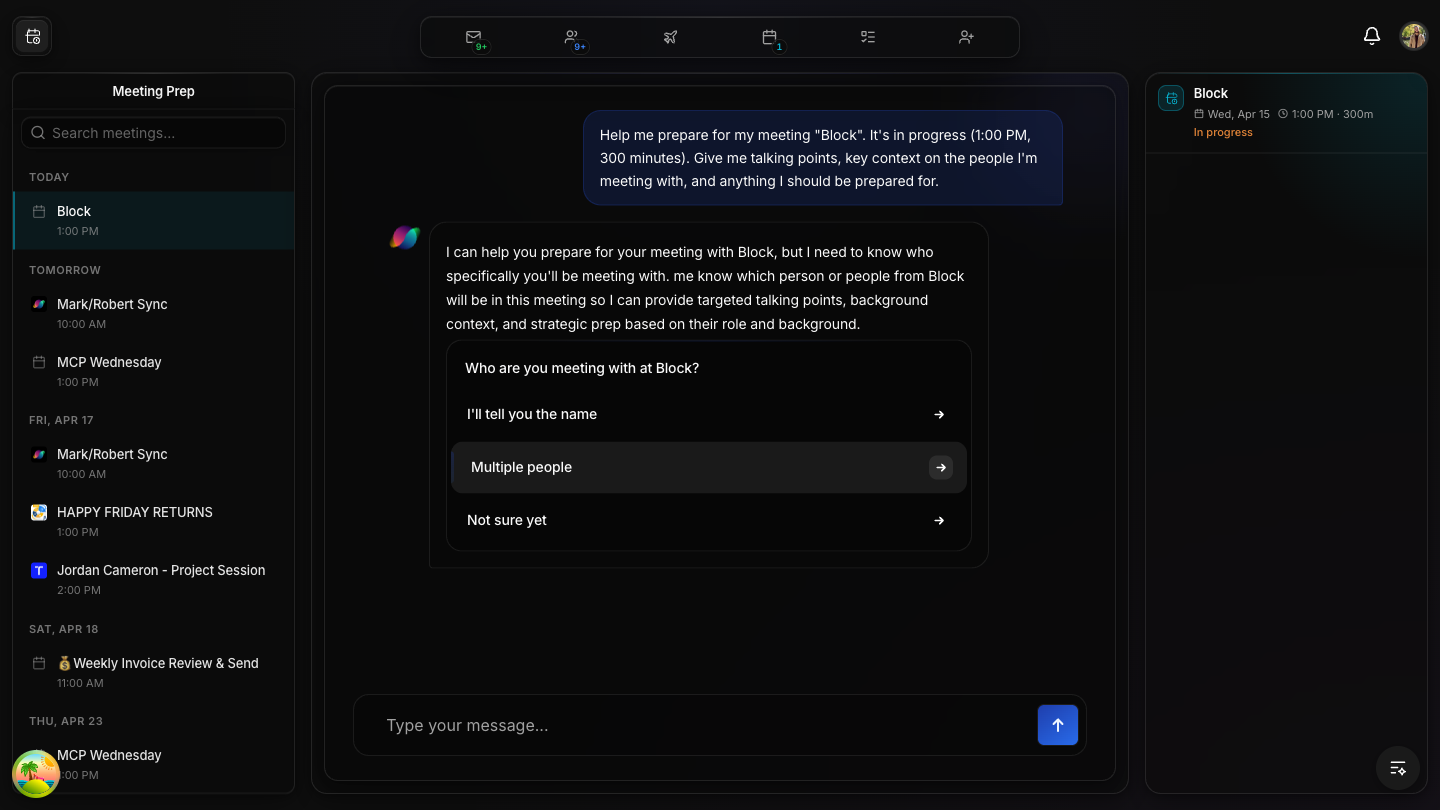
When no attendees are in the user's network, the AI asks for clarification
If no meeting participants are in the user's network (no master_person_id), the system falls back to POST /chat with mode=meeting. The AI asks "Who are you meeting with?" with interactive options: "I'll tell you the name", "Multiple people", "Not sure yet".
Mark Pederson is in-network — "Prep this meeting" triggers the meeting-prep endpoint
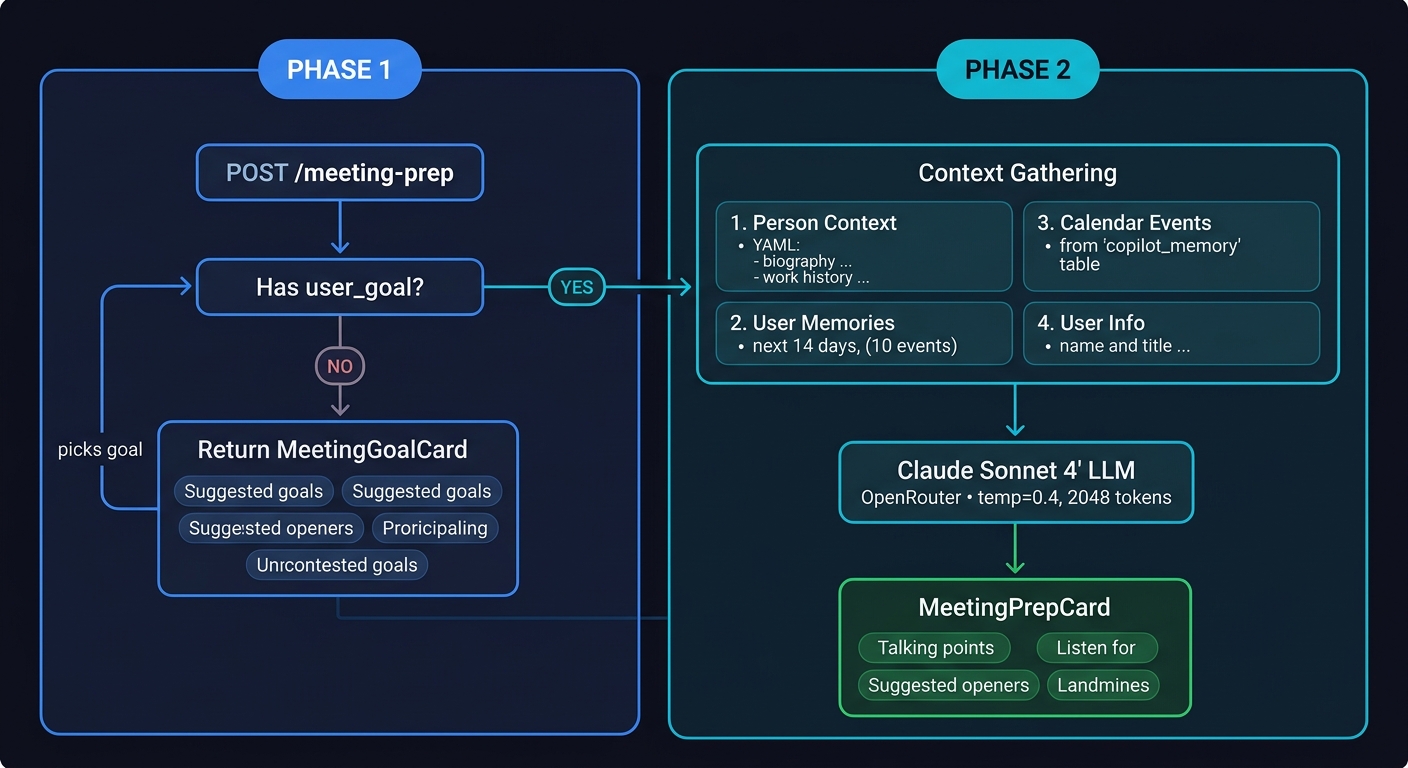
When a participant IS in the user's network (has a master_person_id), clicking prep sends POST /meeting-prep with that person's ID. If no user_goal is provided, the backend returns a MeetingGoalCard with 6 suggested goals:
After selecting a goal, the backend calls Claude Sonnet 4 with the full person context and returns a MeetingPrepCard with talking points, openers, landmines, and shared context.
Sidebar with meetings grouped by day — scrolled to show Tomorrow and Friday
Meeting Prep analyzes calendar events, classifies attendees by company and relationship, and generates contextual talking points, openers, landmines, and shared context for each meeting. It spans 2 API groups, 4 core Xano functions, 15+ database tables, and 3 external services (Nylas, OpenRouter/Claude, Cloud Run).
Three-panel layout (sidebar + canvas + context panel), company logos, classified attendees, "Prep this meeting" gate, CrayonChat with SSE streaming, enriched auto-prompts. 1,085 lines in canvas component alone.
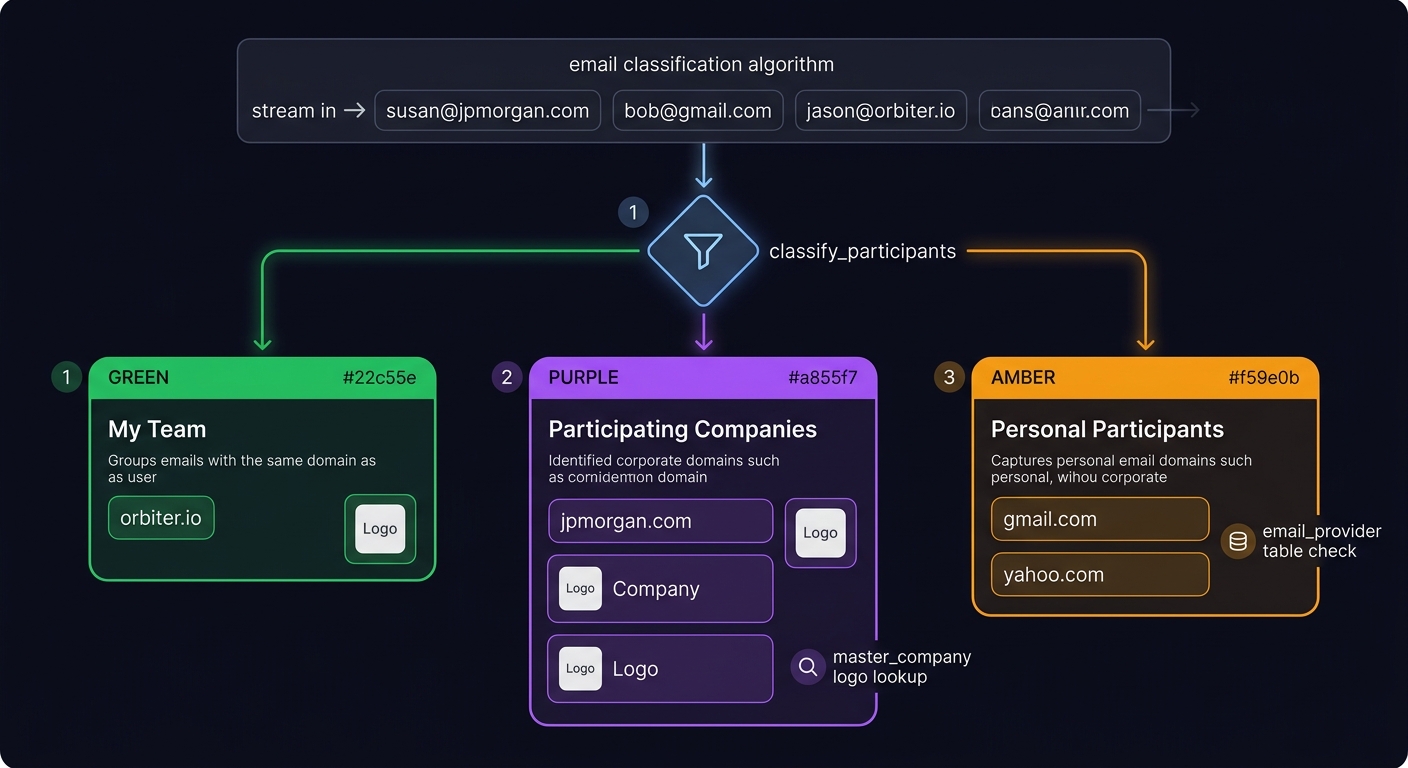
Server-side function that classifies participant emails into my_team, participating_companies, personal_participants using domain matching, email_provider table, and master_company logos. Runs per-event inside GET /calendar-events.
POST /meeting-prep calls Claude Sonnet 4 via OpenRouter (temp 0.4, 2048 tokens). Gathers: person context (YAML), user memories, 14 days of calendar events, and user info. Returns structured JSON with talking points.
meeting_prep_context tableTable created, 8 CRUD endpoints deployed, frontend wired. Context created on first "prep" click with nylas_event_id + desired_outcome. Revisits load instantly from persisted context.
Cloud Run deep research auto-triggers on prep click for each in-network attendee. Email threads fetched from Nylas. Prior meetings with same people surfaced automatically.
POST /meeting-prep-context/email-threads fetches real Nylas threads for meeting participants. Uses safe |get field access for Nylas API compatibility.
POST /meeting-prep-context/prior-meetings finds past calendar events with the same participants. Configurable lookback window (default 90 days).
Google Calendar (user's events)
     |
     v
Nylas v3 API  (per grant_id, paginated, 200/page)
     |
     v
+------------------------------------------------------+
|  GET /calendar-events  (V2 Calendar Events, #4329)   |
|                                                       |
|  1. user table -> get working_timezone                |
|  2. calendar table -> get active calendars            |
|  3. utc-timestamps_v2 -> compute 14-day UTC range     |
|  4. FOR EACH calendar:                                |
|     +- fetch-calendar-events -> Nylas API (paginated) |
|  5. Lambda -> extract unique participant emails        |
|  6. Bulk query: master_email + master_person           |
|  7. Query my_person -> "New to Network" badges         |
|  8. nylas_grant -> email_account per grant_id          |
|  9. FOR EACH event:                                   |
|     +- classify-participants -> my_team / companies /  |
|        personal (email_provider, master_company)       |
|  10. Embed meeting_prep into each event                |
+------------------------+-----------------------------+
                         |
                         v
            Frontend: useCalendarEvents()
            +- Filters out past events
            +- Sorts by start_time
            +- Re-filters every 60 seconds
                         |
           +-------------+-------------+
           v                           v
     MeetingPrepList             MeetingPrepCanvas
     (sidebar, all days)         (today's events only)
           |                           |
           | click                     | "Prep this meeting"
           v                           v
     MeetingCard ----------------> setPrepStarted(true)
     (preview mode)                    |
                                       v
                              CrayonChat (SSE)
                                       |
                     +-----------------+
                     v                 v
          POST /meeting-prep    POST /chat (mode=meeting)
          (in-network person)   (no in-network person)
                     |
          +----------+-----------+
          v                      v
   No user_goal:          Has user_goal:
   -> MeetingGoalCard     -> get-person-context
   -> 6 suggested goals   -> build-memory-context
                          -> GET /calendar/events
                          -> Claude Sonnet 4 (OpenRouter)
                          -> MeetingPrepCard
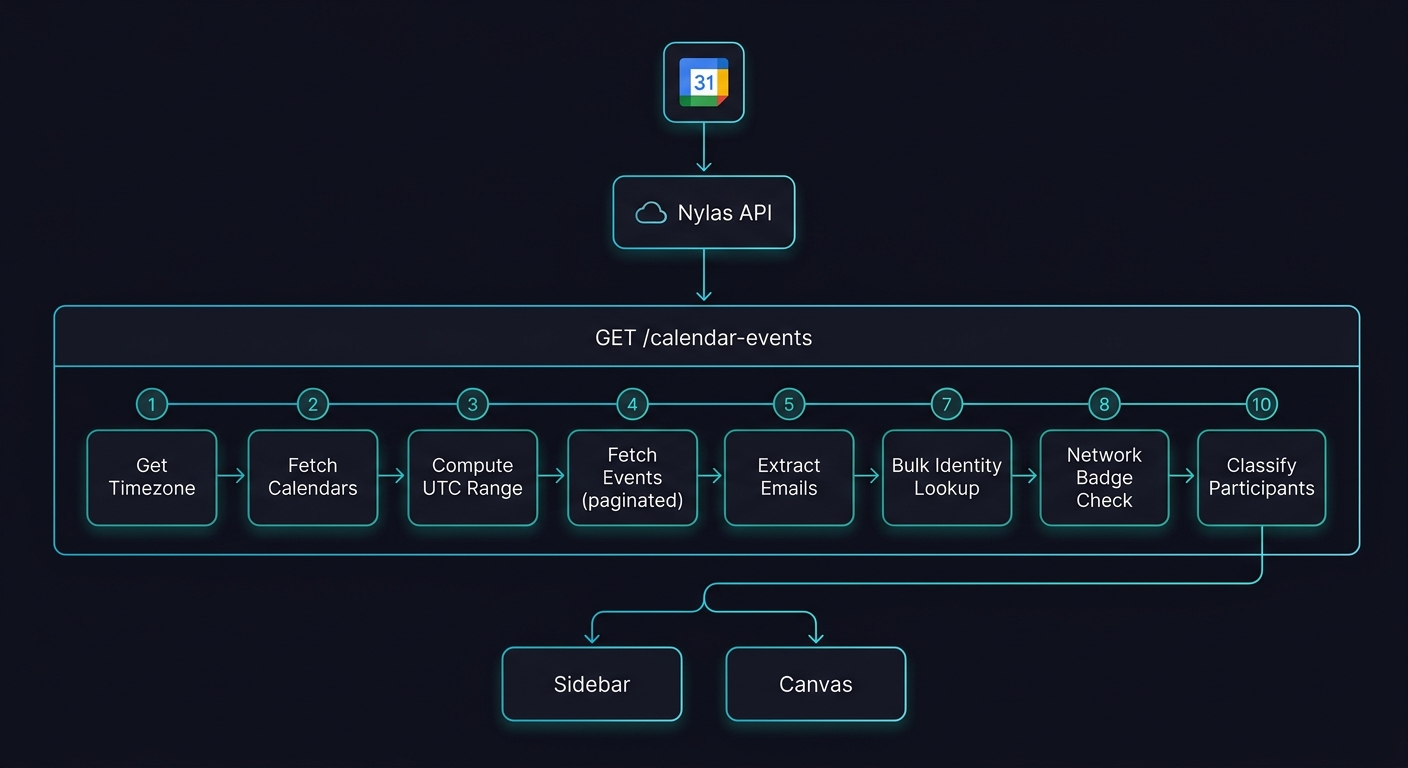
10-step processing chain: Google Calendar → Nylas → enrich → classify → Sidebar + Canvas
meeting_prep into each event.LR2ywW7R — Endpoint #4329 — Auth requiredReads user.settings.working_timezone to convert local dates to UTC.
Queries calendar table for non-holiday calendars where event_widget_preference = true.
Calls utc-timestamps_v2 with time_range=14. Returns midnight today → midnight + 14 days in UTC.
For each calendar, calls fetch-calendar-events which hits Nylas v3 API (GET /v3/grants/{grant_id}/events). Handles pagination with next_cursor, 200 events per page. Logs failures to log_crash.
Lambda collects all unique participant emails across all events into a Set. Used for batch DB lookups.
Single batch query: master_email + master_person join for all participant emails at once. Gets name, avatar, created_at for each person.
Queries my_person for the authenticated user to get created_at per contact. Used for "New to Network" (< 30 days) vs "In Network" badges.
Queries nylas_grant to map grant_id → email_account. Used to exclude the user's own email from participant lists.
For each event, calls classify-participants (function #12742) with participant emails minus the user's own. Embeds result as event.meeting_prep.
Clean event objects with: id, title, when (start/end), conferencing, participants (with email_data + my_person), and meeting_prep classification.
user (125), calendar (223), master_email (155), master_person (139), my_person (128), nylas_grant (183), master_company (142), email_provider (175), environment_variables (272)Emails sorted into My Team (green), Participating Companies (purple), Personal Participants (amber)
user_email (email), participant_emails (email[]). Called once per event inside GET /calendar-events.Pass 1 — Classify each email by domain:
email_provider table (gmail, yahoo, hotmail, etc.):
companyDomains list for Pass 2master_email → master_person to get name, avatar, titleBuild my_team: Query master_company by user's domain for company name + logo. Fall back to logo.dev if not in DB.
Pass 2 — Build participating_companies:
master_company by company_domainmaster_person via master_emaillogo.dev for missing company logos: https://img.logo.dev/{domain}?token=pk_...{
"my_team": {
"master_company_id": 10,
"name": "Orbiter",
"logo": "https://...",
"members": [
{ "master_person_id": 12, "name": "Mark Pederson", "avatar": "...", "title": "CEO" }
]
},
"participating_companies": [
{
"master_company_id": 20, "name": "JP Morgan", "logo": "...",
"members": [{ "master_person_id": 530, "name": "Susan", "title": "VP" }]
}
],
"personal_participants": [
{ "master_person_id": 540, "name": "Bob", "title": "Consultant" }
]
}my_team = your side. participating_companies = the other side(s). A meeting can have people from MULTIPLE external companies. Each company gets its own section with logo and members.Phase 1: ask for goal → Phase 2: gather context + Claude Sonnet 4 → MeetingPrepCard
Bd_dCiOz — Endpoint #8098 — Auth required| Parameter | Type | Required | Description |
|---|---|---|---|
master_person_id | int | Yes | The person to prep for |
meeting_id | int | No | Specific meeting (unused in current logic) |
context | text | No | Additional context from user |
user_goal | text | No | User's desired outcome — triggers full generation |
If user_goal is empty, the endpoint returns immediately with suggested goals:
{
  "success": true,
  "needs_user_goal": true,
  "master_person_id": 520,
  "person": { "name": "Ray Deck", "title": "CEO", "avatar": "..." },
  "suggested_goals": [
    "Close a deal or partnership",
    "Get an introduction to someone in their network",
    "Pitch my product or idea",
    "Build the relationship",
    "Follow up on a previous conversation",
    "Ask for advice or mentorship"
  ]
}When a goal is provided, the endpoint gathers context from 4 sources:
get-person-context (#12570): work history, education, skills, roles, location. Returns YAML string.build-memory-context (#12665): active memories from copilot_memory table, formatted as [USER MEMORY]...[/USER MEMORY] tags.user table with master_person addon.GET /calendar/events (#8125) for 14 days ahead, limited to 10 events.| Parameter | Value |
|---|---|
| Provider | OpenRouter (https://openrouter.ai/api/v1/chat/completions) |
| Model | anthropic/claude-sonnet-4 |
| Temperature | 0.4 (lower for factual output) |
| Max tokens | 2048 |
| Timeout | 60 seconds |
| System prompt | "You are a meeting prep AI. Output ONLY valid JSON." |
{
  "success": true,
  "master_person_id": 520,
  "person": { "name": "Ray Deck", "title": "CEO", "avatar": "..." },
  "prep": {
    "person_summary": "Ray is the CEO of StateChange, a Series A startup...",
    "talking_points": [
      {
        "topic": "Recent funding round",
        "opener": "I saw StateChange just closed their Series A...",
        "why_they_care": "They're scaling the team and looking for partnerships"
      }
    ],
    "suggested_openers": ["Congrats on the funding...", "How's the team scaling going?"],
    "listen_for": ["Signs of budget constraints", "Hiring challenges"],
    "landmines": ["Don't mention competitor X", "Avoid pricing discussions"]
  },
  "model": "anthropic/claude-sonnet-4"
}JSON.parse first, then regex extraction of {"person_summary"...}. On total failure, returns a static error object with empty arrays.mode=meeting, uses a meeting-specific system prompt from copilot_config (ID: 4). Used when no in-network attendees exist, or for follow-up questions after initial prep.Bd_dCiOz — Endpoint #8064 — Auth requiredcopilot_config table (name: "meeting") — instructs AI to provide briefings with TALKING POINTS, SUGGESTED OPENERS, WATCH OUT FOR sectionsbuild-memory-context appended to system prompt[ACTIVE PERSON CONTEXT]...[/ACTIVE PERSON CONTEXT] tagsdispatch_confirmation)| Component | File | Lines | Purpose |
|---|---|---|---|
MeetingPrepCanvas | meeting-prep-canvas.tsx | 1,247 | Main orchestrator — MeetingCards + CrayonChat + context persistence + processMessage handler |
MeetingPrepList | meeting-prep-list.tsx | 192 | Sidebar — events grouped by day, company logos, search integration |
MeetingPrepContextPanel | meeting-prep-context-panel.tsx | 499 | Right panel — meeting details, classified attendees with click-to-profile |
MeetingPrepSearch | meeting-prep-search.tsx | 33 | Search input with debounced filtering |
MeetingGoalCard | crayon/meeting-goal-card.tsx | ~120 | CrayonChat template: goal selection with person avatar + suggested goals |
MeetingPrepCard | crayon/meeting-prep-card.tsx | ~200 | CrayonChat template: full prep display with talking points, openers, landmines |
No meeting selected         Meeting selected            Prep started
(prepStarted=false)         (prepStarted=false)         (prepStarted=true)
-----------------          -----------------           -----------------
Show today's meetings       Show single MeetingCard     Show CrayonChat
as rich cards               with classified attendees   with SSE streaming

     |                           |                          |
     | click sidebar item        | click "Prep this         | processMessage()
     +-------------------------->|  meeting" button         | handles:
                                 |                          | 1. getMeetingPrep()
                                 v                          | 2. [MEETING_GOAL] prefix
                          prepInitiatedRef = true           | 3. chat(mode=meeting)
                          createMeetingPrepContext()
                          triggerResearch() (fire & forget)
                          fetchEmailThreads() (fire & forget)
                          fetchPriorMeetings() (fire & forget)
                                 |
                                 +------------------------>|
                                                            |
On revisit: useEffect loads persisted context from
getMeetingPrepContext(eventId) — skips re-gathering
When CrayonChat opens, the conversation starter contains an auto-generated prompt built from the selected event:
Help me prepare for my meeting "[Title]"master_person_ids| Hook | URL Param | Purpose |
|---|---|---|
useSelectedMeeting() | ?meeting-id=<eventId> | Currently selected meeting (resets prepStarted on change) |
useMeetingPrepSearch() | ?meeting-prep-q=<query> | Search filter for sidebar (uses useDeferredValue) |
participant.email_data.my_person.created_at determines badge: < 30 days = New to Network, ≥ 30 days = In Network.
my_person.created_at (when THIS USER added the person to THEIR network), NOT master_person.created_at (when the record was created globally). This was a bug that was fixed.| Table | ID | Key Fields | Role |
|---|---|---|---|
calendar | 223 | user_id, external_id, grant_id, name, is_primary, event_widget_preference | User's connected calendars (Nylas OAuth) |
event | 221 | title, external_id, start, end, calendar_id, master_event_id, event_data | Calendar events (local cache from Nylas) |
master_event | 222 | external_id, calendar_id, title, recurrence | Recurring event templates |
nylas_grant | 183 | user_id, grant_id, email_account, provider, grant_expired | Nylas OAuth grants — maps grant_id to email |
| Table | ID | Key Fields | Role |
|---|---|---|---|
master_person | 139 | name, avatar, current_title, bio, bio_500, deep_bio, social_insights, linkedin_url, master_company_id | Master identity record (enriched) |
master_company | 142 | company_name, logo, company_domain, about, about_500, tagline, linkedin_url | Master company record (logo used in classify) |
master_email | 155 | email_address, master_person_id, master_company_id, email_type | Email → person mapping (bulk lookup in calendar-events) |
my_person | 128 | user_id, master_person_id, created_at, last_activity_at | User's network — created_at drives "New to Network" badge |
email_provider | 175 | provider_domain | Personal email domain list (gmail, yahoo, hotmail) for classify |
| Table | ID | Key Fields | Role |
|---|---|---|---|
work_experience | 147 | master_person_id, master_company_id, title, company_name, start/end year | Work history for person context prompt (YAML) |
education_experience | 230 | master_person_id, school_name, field_of_study, degree_name | Education for person context prompt |
copilot_memory | 658 | user_id, scope, category, key, value, confidence, active | User memories injected into LLM prompts |
copilot_config | 541 | name, prompt | System prompts per mode (meeting = config ID 4) |
profile_enrichment_job | 686 | job_id, master_person_id, request_type, model, processing, llm_response, error | Deep research job queue — Cloud Run writes here |
deep_biography | 591 | master_person_id, biography, processing | Deep bio storage (legacy) |
| Table | Key Fields | Role |
|---|---|---|
meeting_prep_context | user_id, nylas_event_id, desired_outcome, team_structure, participant_context, email_threads, prior_meetings, checklist_status, qa_history | Persistent prep context per event — created on first "prep" click, loaded instantly on revisit |
meeting_transcriptions | user_id, nylas_event_id, transcript, video_url, audio_url, markdown, summary | Meeting recordings & transcripts — standalone table, linked to events but separate from prep |
meeting_prep_context persists forever. Next visit loads from table instantly (no re-gathering). meeting_transcriptions is standalone — users transcribe ALL meetings, not just prepped ones. meeting_prep_context can reference transcriptions to auto-surface prior meeting notes when re-meeting the same people.| Table | ID | Key Fields | Role |
|---|---|---|---|
copilot_conversations | 636 | user_id, mode, title, master_person_id | Conversation threads |
copilot_chat_messages | 637 | conversation_id, role, content, template_name | Individual messages |
| Table | ID | Key Fields | Role |
|---|---|---|---|
user | 125 | master_person_id, workos_id, settings (JSON with working_timezone) | User accounts (WorkOS auth) |
environment_variables | 272 | name, value, is_nylas | Runtime config (Nylas API keys) |
process | 633 | user_id, type, status, progress, current_step | Async process tracking |
log_crash | 542 | function_name, error_message, data | Error logging |
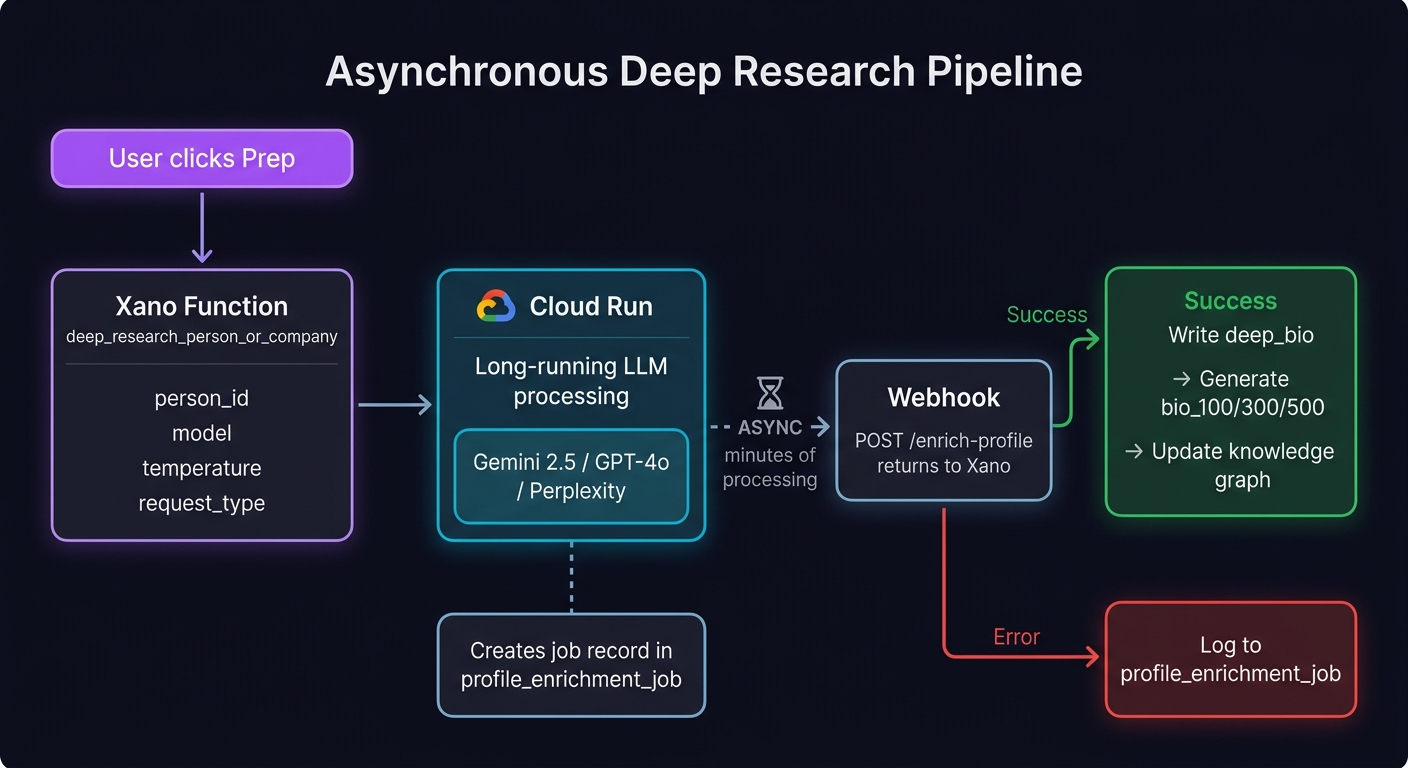
Xano → Cloud Run (async) → Webhook → deep_bio + bio_100/300/500 + knowledge graph
Xano: deep-research-person-or-company (#12747)
  |
  +- Inputs: master_person_id OR master_company_id
  |          model, temperature, max_tokens, request_type
  |          system_prompt, user_prompt, provider_order
  |
  +- Fetches person/company record from DB
  +- Builds OpenRouter-compatible payload (Lambda)
  |   +- Perplexity models: collapse system+user into single message
  |
  v
POST https://orbiter-enrich-20506320032.us-east4.run.app/enrich
  |  Query params: master_person_id or master_company_id
  |  Body: { webhook_url, payload: { model, messages, max_tokens } }
  |  Auth: X-API-Key header ($env.deep_research_api_key)
  |
  +- Creates profile_enrichment_job record (job_id, request_type, model)
  |
  v  (async — minutes of processing on Cloud Run)
  |
Webhook: POST /enrich-profile (#8303, webhooks group)
  |
  +- On success:
  |  +- Update profile_enrichment_job: llm_response, processing=false
  |  +- Write deep_bio to master_person record
  |  +- Run create-llm-person-bios -> generates bio_100, bio_300, bio_500
  |  +- Run update-person-node -> sync knowledge graph
  |
  +- On error:
     +- Update profile_enrichment_job: error, processing=false
triggerMeetingPrepResearch(contextId, personIds) fires on prep click for each in-network attendee. Runs as fire-and-forget — the frontend continues to CrayonChat immediately while deep research runs asynchronously in Cloud Run.| Service | Used By | Purpose | Auth |
|---|---|---|---|
Nylas v3 APIapi.us.nylas.com |
fetch-calendar-events, send-rsvp, email-threads | Calendar event sync (paginated, 200/page) + email thread search for meeting context | Bearer token from environment_variables |
OpenRouteropenrouter.ai |
/meeting-prep, /chat | LLM routing to Claude Sonnet 4 | Bearer token from $env.openRouter |
Cloud Runorbiter-enrich-*.run.app |
deep-research function | Async long-running LLM research | X-API-Key from $env.deep_research_api_key |
| logo.dev | classify-participants | Fallback company logos by domain | Token in URL: pk_Twvl42WzTX2-ySNbnZKlSA |
The MeetingCard's "What is the ideal outcome?" input was dead code — the focus state was captured but never passed to the API. Now:
onPrepMeeting callback accepts (eventId, desiredOutcome?)desiredOutcomeRef (persists across renders)getMeetingPrep(personId, { userGoal }) in processMessage Branch BThe animated progress bar at the bottom of MeetingCards was purely cosmetic — no async context gathering was happening. Removed entirely. Will be re-added as a real progress indicator once meeting_prep_context table and deep research wiring ship.
| Test | Method | Result |
|---|---|---|
| POST /meeting-prep (no goal) | curl via dev-token | PASS Returns needs_user_goal: true + 6 goals |
| POST /meeting-prep (with goal) | curl via dev-token | PASS Returns full prep (talking points, openers, landmines) |
| MeetingCard UI → CrayonChat flow | Browser (WorkOS auth) | PASS MeetingGoalCard + MeetingPrepCard render correctly |
| Build + Lint | pnpm build && pnpm lint | PASS 0 new warnings |
Commit: 281900d on feat/meeting-prep-ui-overhaul
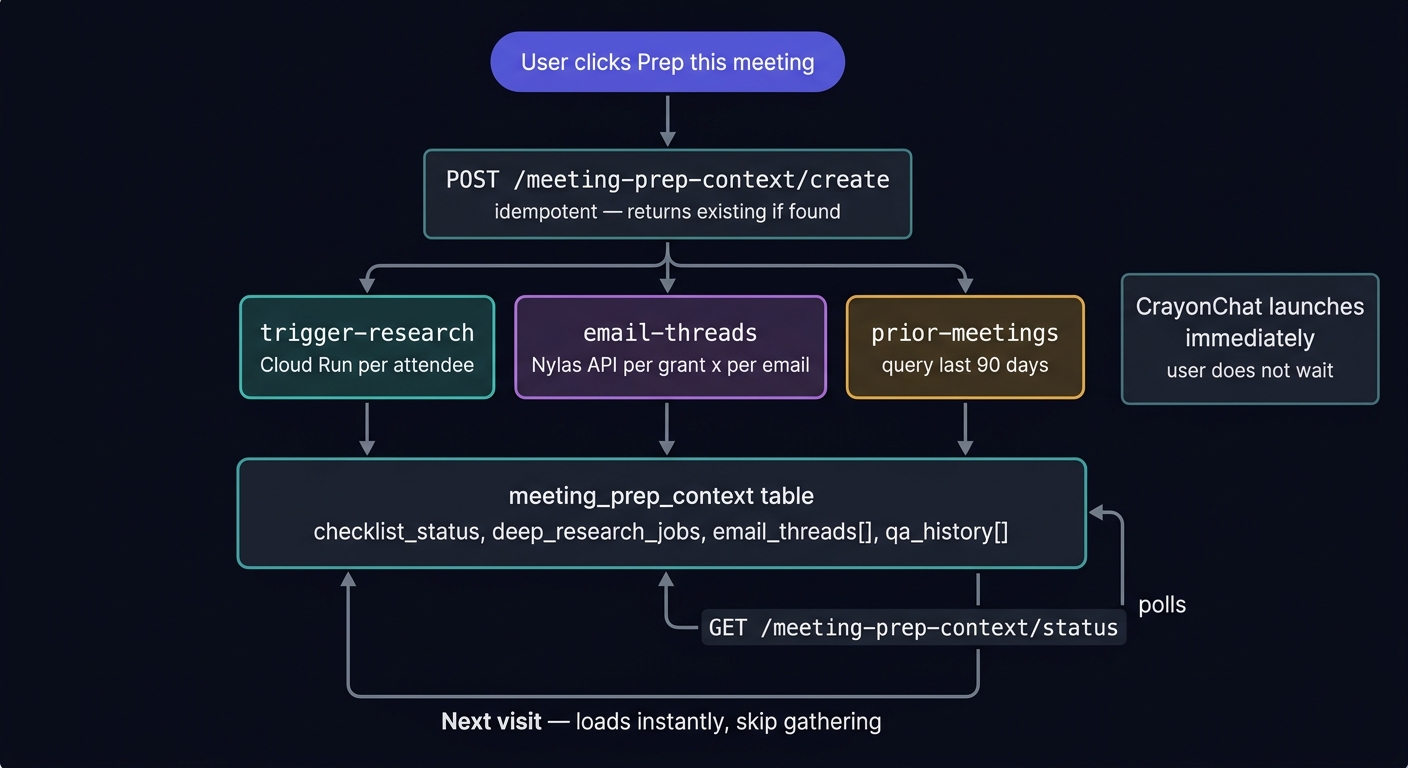
Context persistence pipeline — gather once, persist forever, load instantly on revisit
The context persistence pipeline was built on April 15 — 8 Xano endpoints, 2 new tables, and full frontend integration. When a user clicks "Prep this meeting", the system:
meeting_prep_context record (idempotent — POST returns existing if already created)created: false if context already exists for this event. Stores nylas_event_id, desired_outcome, team_structure, participant_context.Bd_dCiOz — Auth requirednylas_event_id. Returns context: null if none exists (first visit). Used by useEffect on meeting selection to check for existing context.Bd_dCiOz — Auth requiredqa_history, desired_outcome, checklist_status, email_threads, prior_meetings. Used after CrayonChat Q&A to persist conversation.Bd_dCiOz — Auth requiredchecklist_status (JSON) and qa_count (int). Designed for real-time progress indicators.Bd_dCiOz — Auth requiredcontext_id and person_ids[]. Calls deep_research_person_or_company for each person in a loop. Fire-and-forget from frontend.Bd_dCiOz — Auth required|get:"field":default access pattern for Nylas API fields. Returns thread summaries (subject, snippet, message count, timestamp).Bd_dCiOz — Auth requireddays_back (default 90). Uses add_secs_to_timestamp with days * 86400 for date math.Bd_dCiOz — Auth requiredBd_dCiOz — Auth requirednylas_event_id, transcript, video_url, audio_url, markdown, summary.Bd_dCiOz — Auth requirednylas_event_id. Returns array of transcription records.Bd_dCiOz — Auth requiredThe canvas component (meeting-prep-canvas.tsx, now 1,247 LOC) integrates the context pipeline with a ref-guarded state machine:
The useEffect([selectedId]) was resetting prepStarted to false after onPrepMeeting set it to true in the same render cycle. Fixed with prepInitiatedRef — a ref guard that skips the reset when prep is being actively initiated:
const prepInitiatedRef = useRef(false);

// In onPrepMeeting handler:
prepInitiatedRef.current = true;   // Guard before state change
setSelectedId(id);                  // Triggers useEffect
setPrepStarted(true);               // Would be reset without guard

// In useEffect:
if (prepInitiatedRef.current) {
  prepInitiatedRef.current = false; // Consume the guard
  return;                           // Skip reset
}
setPrepStarted(false); // Normal reset on navigationDeep research, email threads, and prior meetings are triggered as .catch(console.warn) calls from the onPrepMeeting handler. The frontend launches CrayonChat immediately and doesn't wait for background gathering to complete. This keeps the UI responsive while context accumulates in the meeting_prep_context table.
Nylas thread API returns fields that XanoScript couldn’t access via direct $thread.field syntax. Rewrote to use safe |get:"field":default pattern for all thread properties (id, subject, last_message_timestamp, snippet, message_ids).
XanoScript has no add_days_to_timestamp filter. Fixed by converting to seconds (days * 86400) and using add_secs_to_timestamp with negated value: now|add_secs_to_timestamp:$neg_secs.
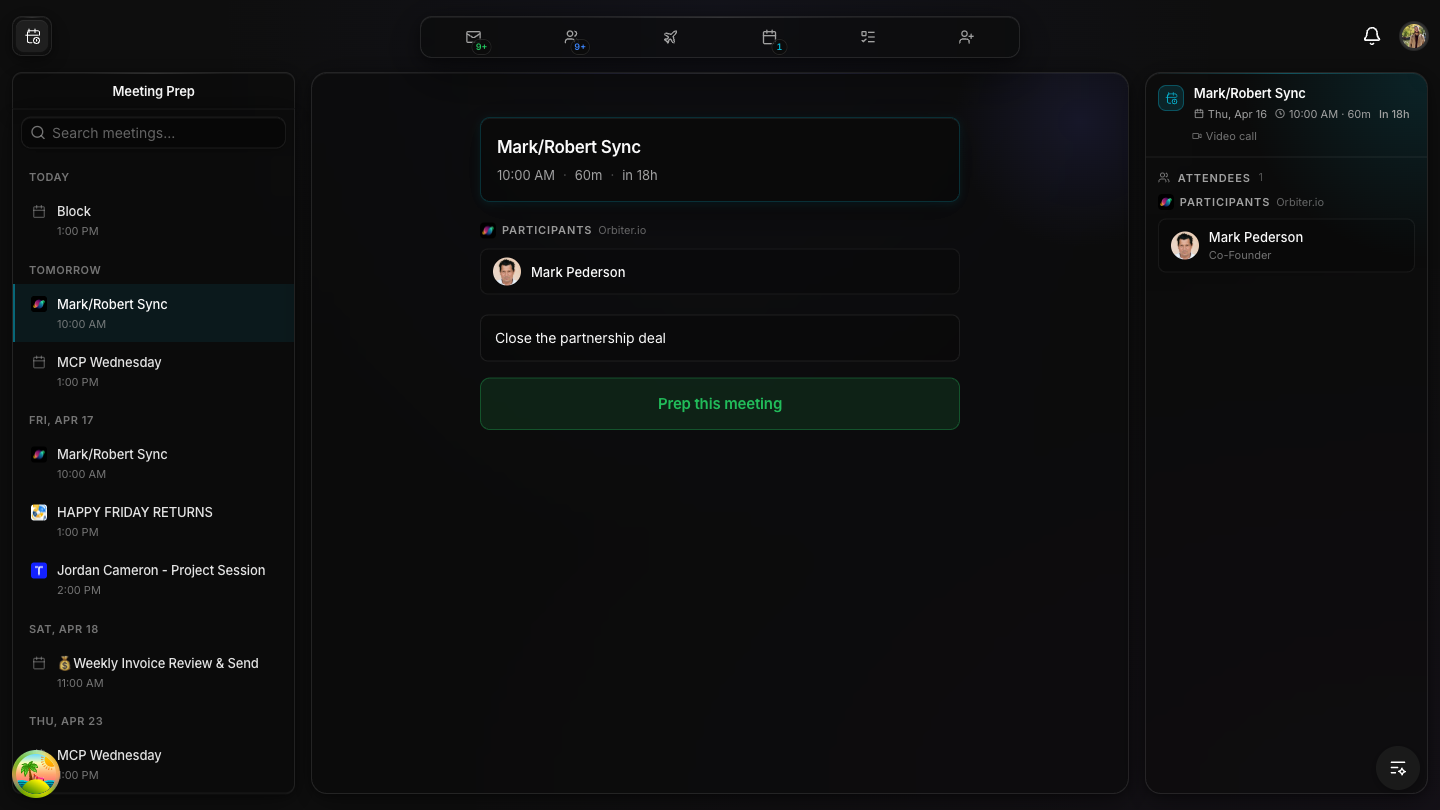
Complete end-to-end testing: curl verified all 11 backend endpoints, then browser-tested the full meeting prep flow with live WorkOS auth and real Xano data.
User types "Close the partnership deal" — this persists to meeting_prep_context.desired_outcome
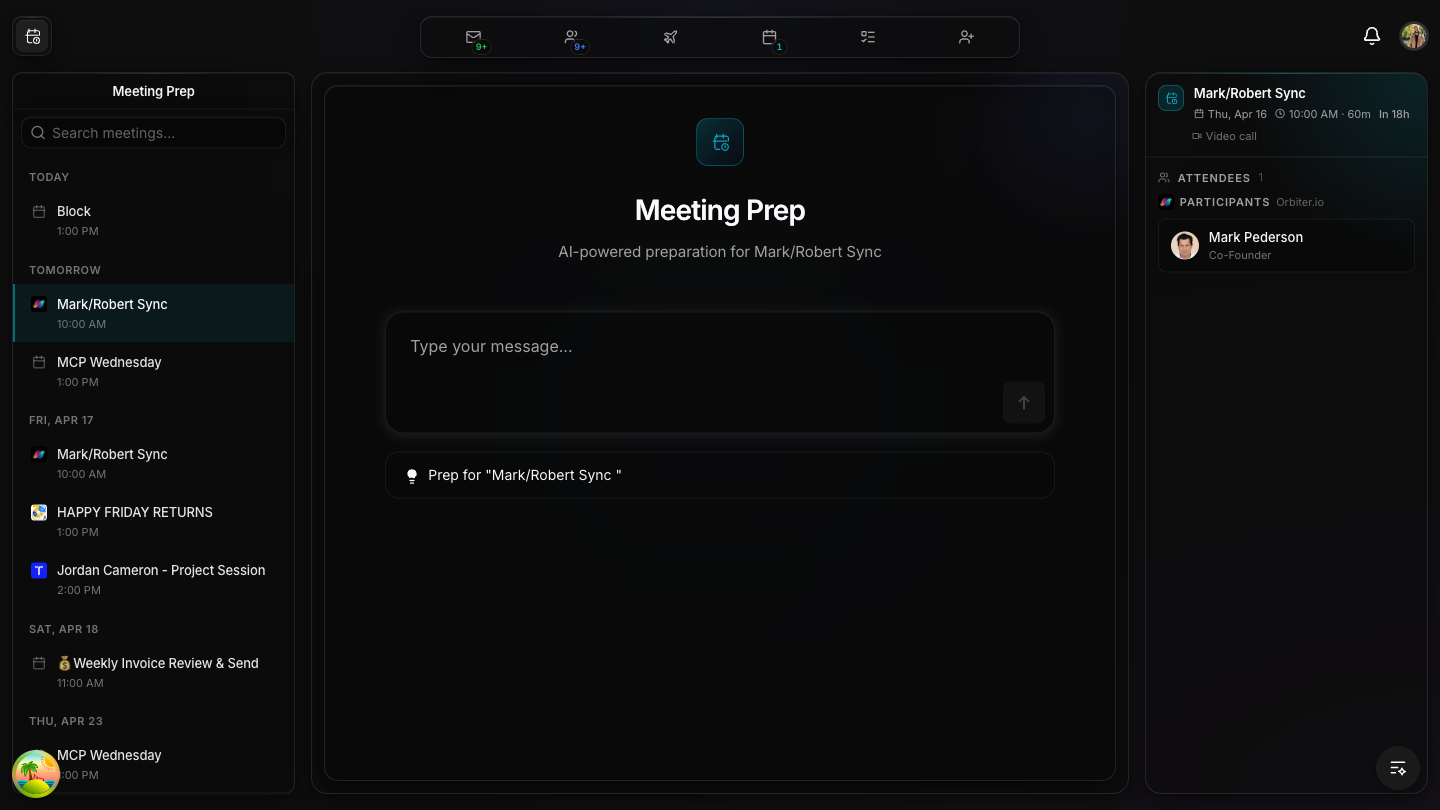
CrayonChat launches — context persisted in Xano, deep research + email threads + prior meetings triggered in background
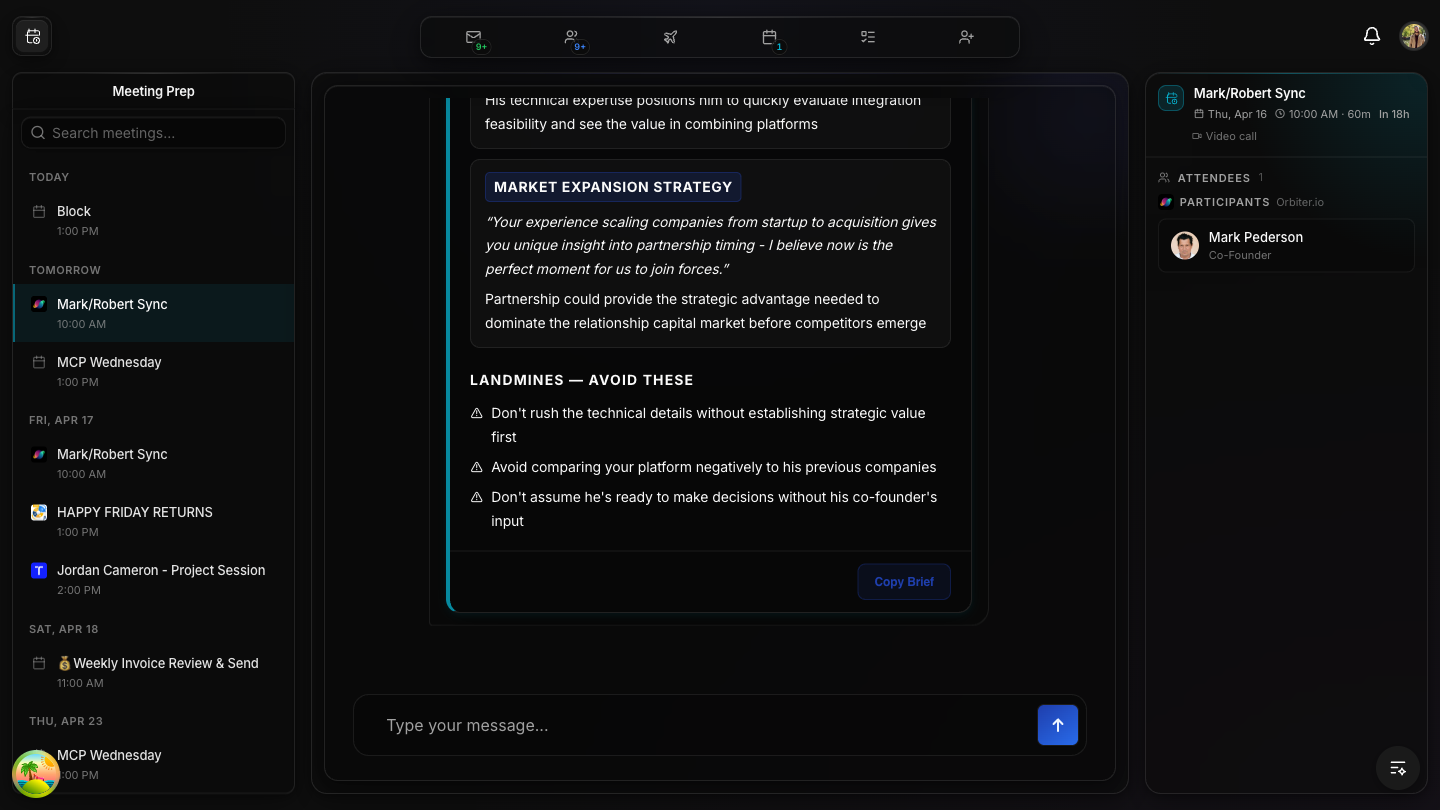
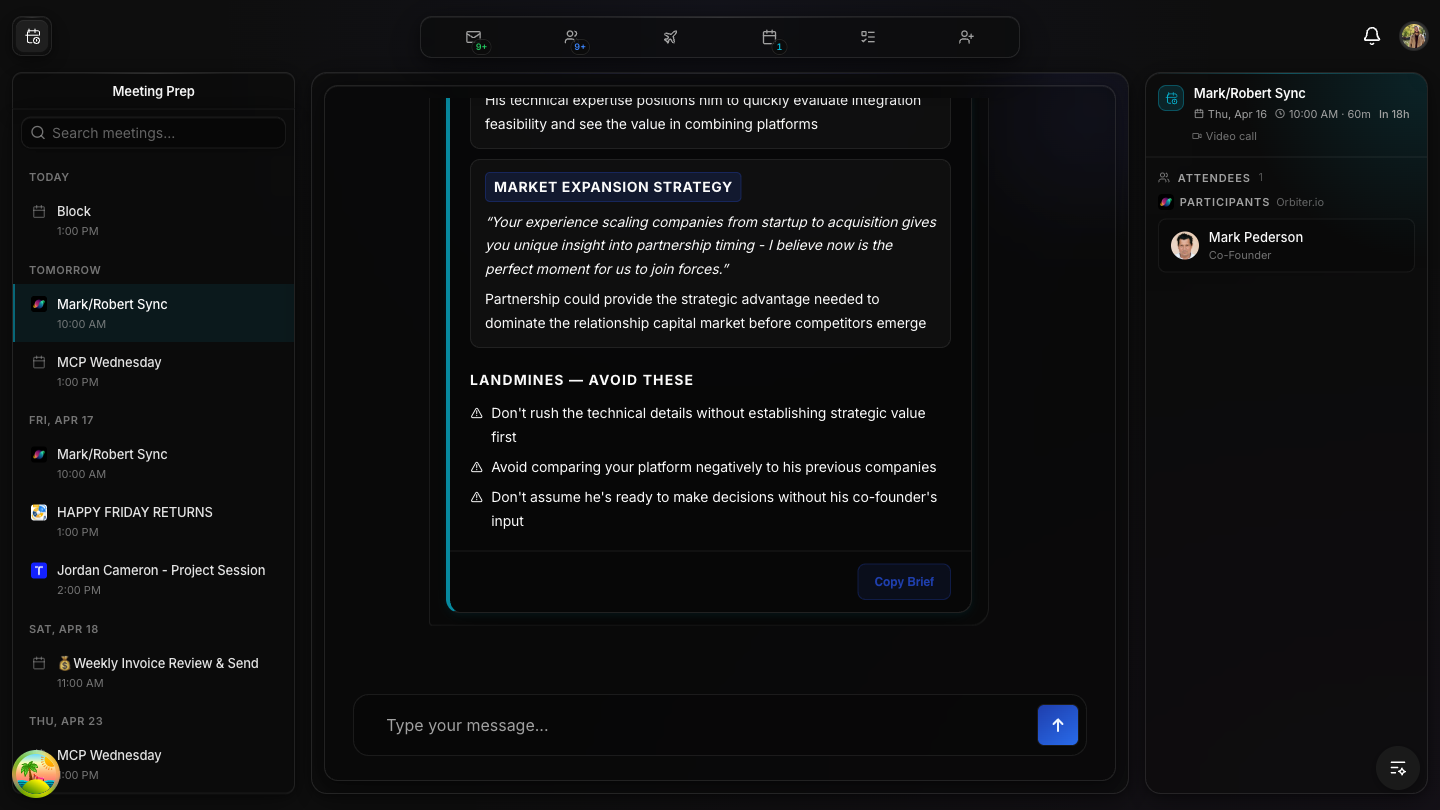
Full AI prep — market expansion strategy, talking points, and "Copy Brief" button
LANDMINES section warns about pitfalls — actionable intelligence for the meeting
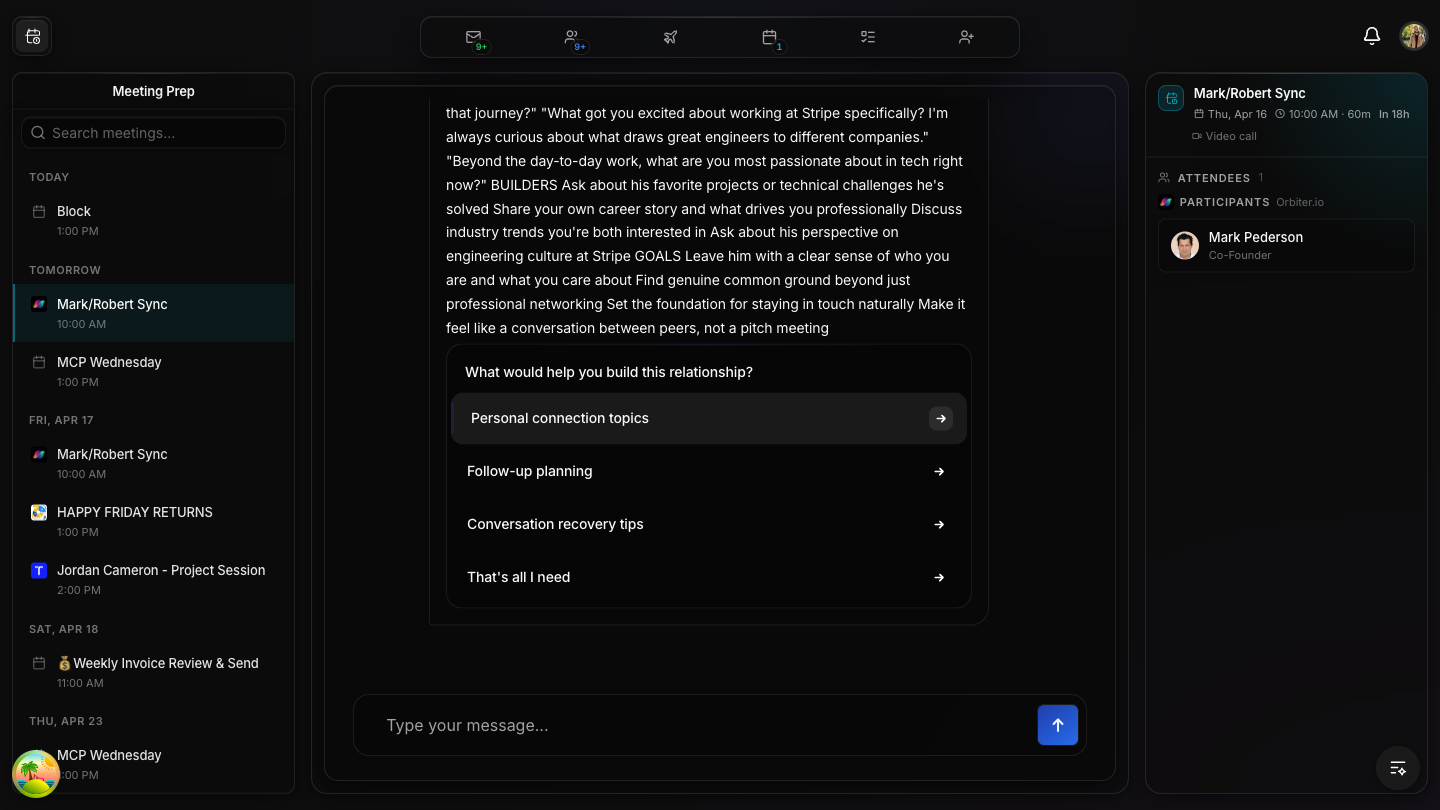
Follow-up conversation — AI suggests personal connection topics, planning strategies, and conversation recovery
| Endpoint | Method | Result | Notes |
|---|---|---|---|
/meeting-prep-context | GET | PASS | Returns context: null for new events, full context for existing |
/meeting-prep-context/create | POST | PASS | Idempotent — created: true first time, created: false on repeat |
/meeting-prep-context/update | PATCH | PASS | Updates QA history + desired outcome |
/meeting-prep-context/status | GET | PASS | Returns checklist + qa_count |
/meeting-prep-context/trigger-research | POST | PASS | Triggers deep research for person IDs |
/meeting-prep-context/email-threads | POST | PASS | Found 5 real Nylas threads (after XanoScript fix) |
/meeting-prep-context/prior-meetings | POST | PASS | Found past meetings with Mark (after timestamp fix) |
/meeting-prep-context/upload | POST | PASS | File upload endpoint ready |
/meeting-transcriptions | POST | PASS | Transcription created successfully |
/meeting-transcriptions | GET | PASS | Returns transcription records |
/meeting-prep (existing) | POST | PASS | Full prep generation still works |
Commits: 1bd230f (context pipeline) + 4ed33e8 (race condition fix) on feat/meeting-prep-ui-overhaul
| # | Context Item | Source | Status |
|---|---|---|---|
| 1 | Deep bio per attendee | Cloud Run deep research | WIRED |
| 2 | Social insights per attendee | Enrichment pipeline | PLANNED |
| 3 | Deep company research per company | Cloud Run deep research | WIRED |
| 4 | Recent email threads related to meeting | Nylas email API | DONE |
| 5 | YouTube transcripts (if available) | Web search | ENDPOINT EXISTS |
| 6 | Prior meeting transcript (same people) | meeting_transcriptions table | DONE |
getMeetingPrep APImeeting_prep_context table in Xanomeeting_transcriptions table in XanoprepInitiatedRef/status endpoint)/calendar-events (#4329) uses fetch-calendar-events with full enrichment. The Robert API /calendar/events (#8125) uses the older nylas-calendar-get-filtered-events with no enrichment. The meeting-prep endpoint calls the simplified one internally for LLM context — these are independent calls.
|get:"field":default is mandatory for Nylas API responses. Direct property access ($thread.field) causes "Unable to locate var" errors when fields are missing. Always use the safe filter pattern for external API data.
add_days_to_timestamp doesn’t exist. Must use add_secs_to_timestamp with days * 86400. This is a common trap — the filter name suggests it should exist but it doesn’t.
prepInitiatedRef) to skip the reset in the same render cycle.
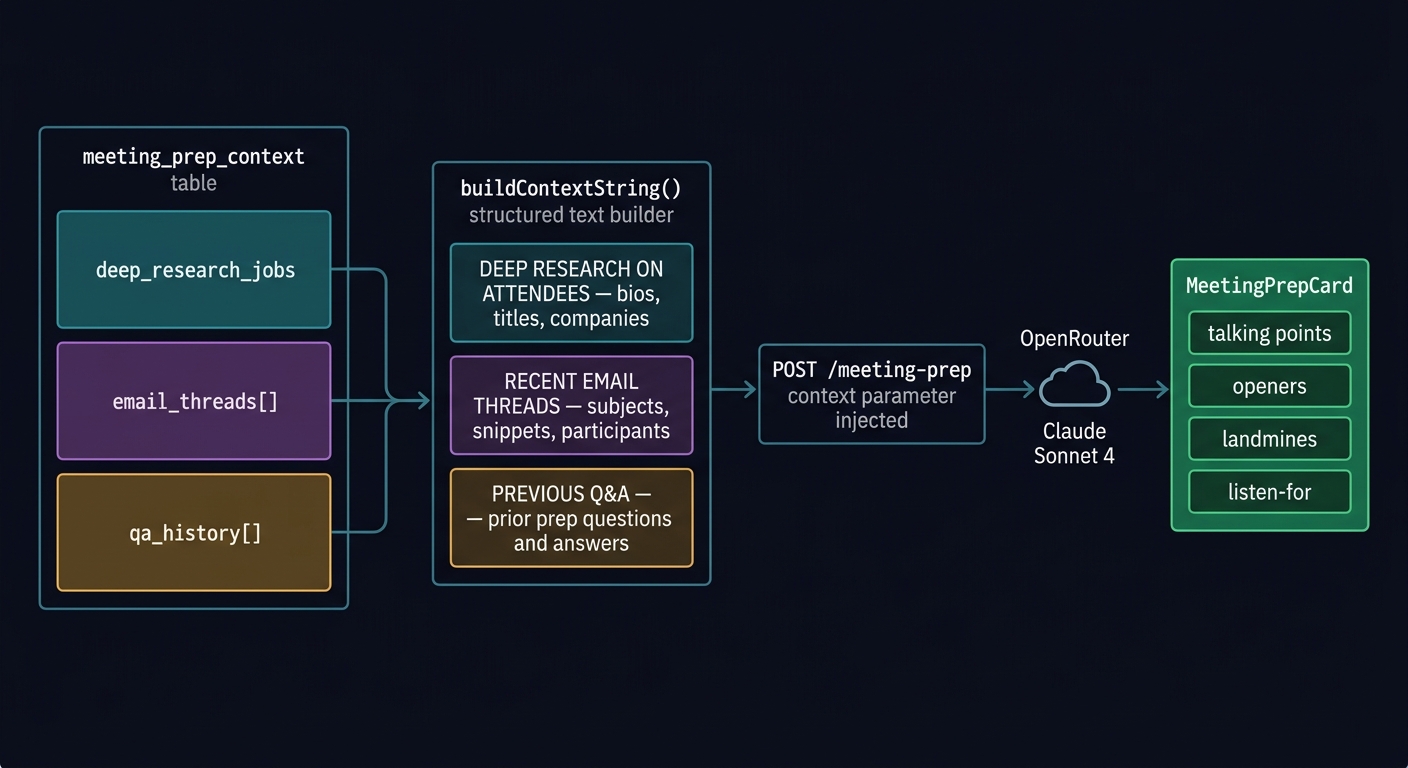
The meeting prep context pipeline was gathering data but never using it. Deep research bios, email threads, and prior meetings were stored in the meeting_prep_context table on Xano — but the LLM prompt never included them. Three fixes shipped today:
Before each getMeetingPrep() or chat() call, the system now re-fetches the latest context from Xano and builds a structured context string with three sections:
This context is passed via the existing context parameter — no API changes needed.
Previously, clicking “Prep this meeting” opened CrayonChat and showed a starter chip that the user had to click again. Now the message fires automatically — one click, prep starts immediately.
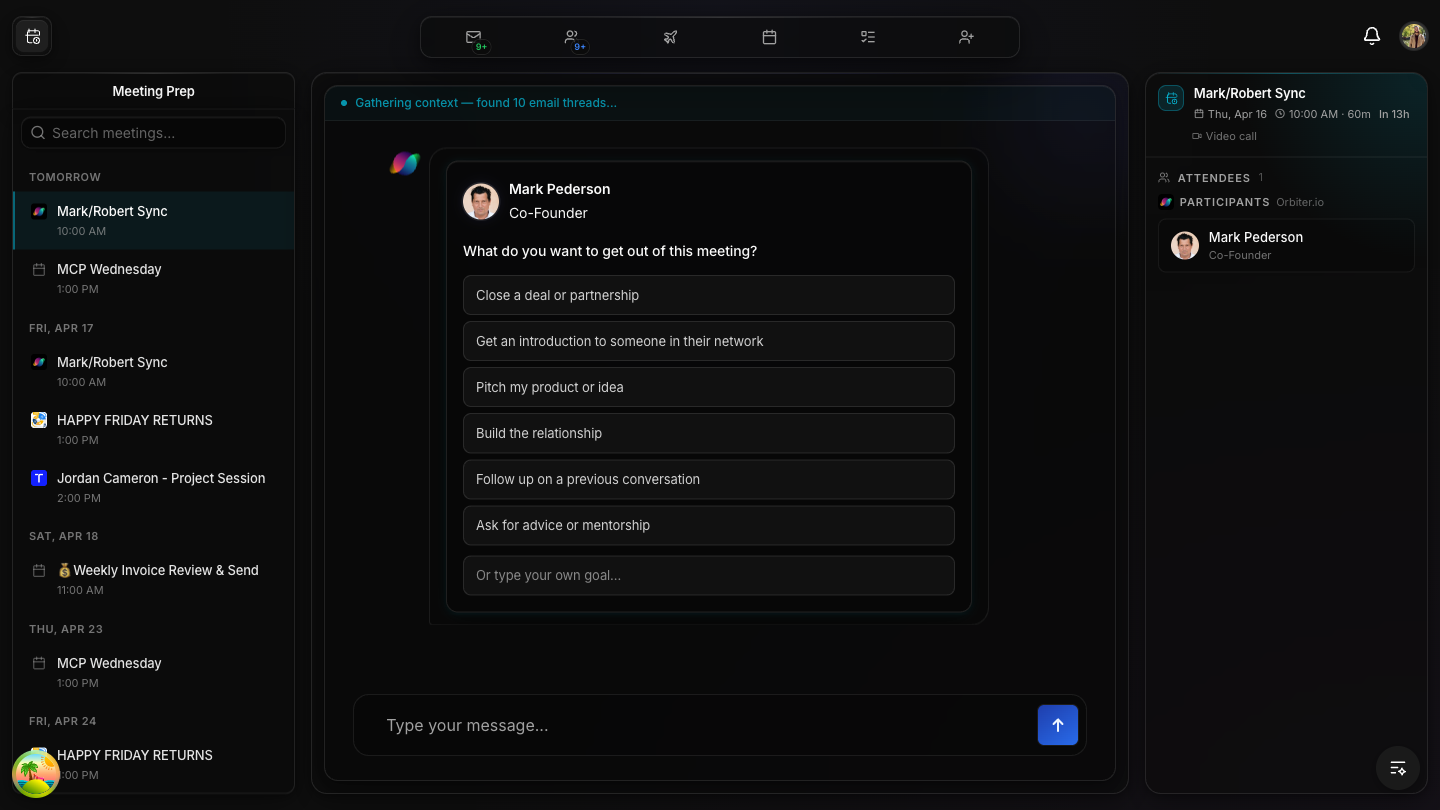
The status banner was opaque — just “Gathering context...” then “Context ready” with no visibility into what was gathered. Now it shows specific items:
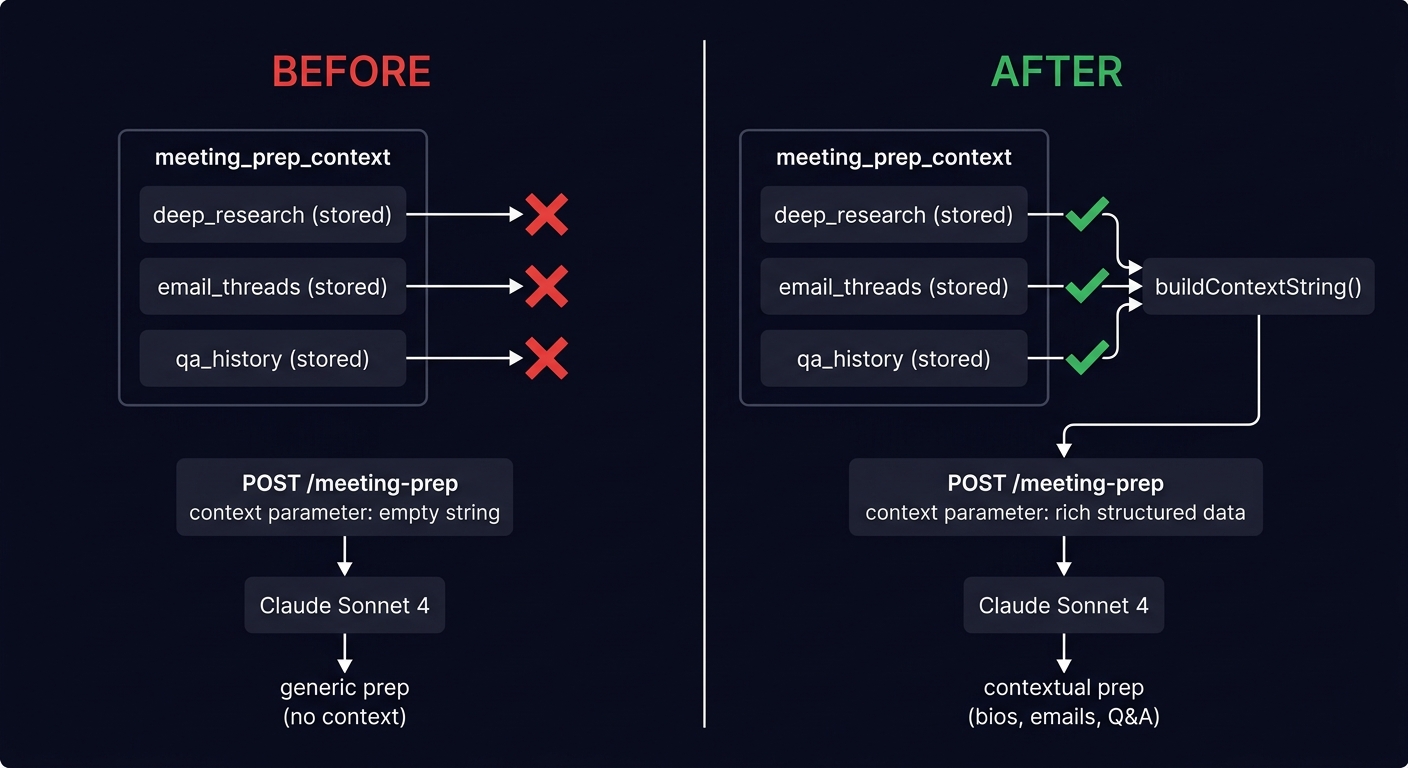
Three async calls (triggerMeetingPrepResearch, fetchMeetingPrepEmailThreads, fetchPriorMeetings) were discarding their results with .catch(console.warn). Now they re-fetch the context after completing, so subsequent LLM calls have the latest data.
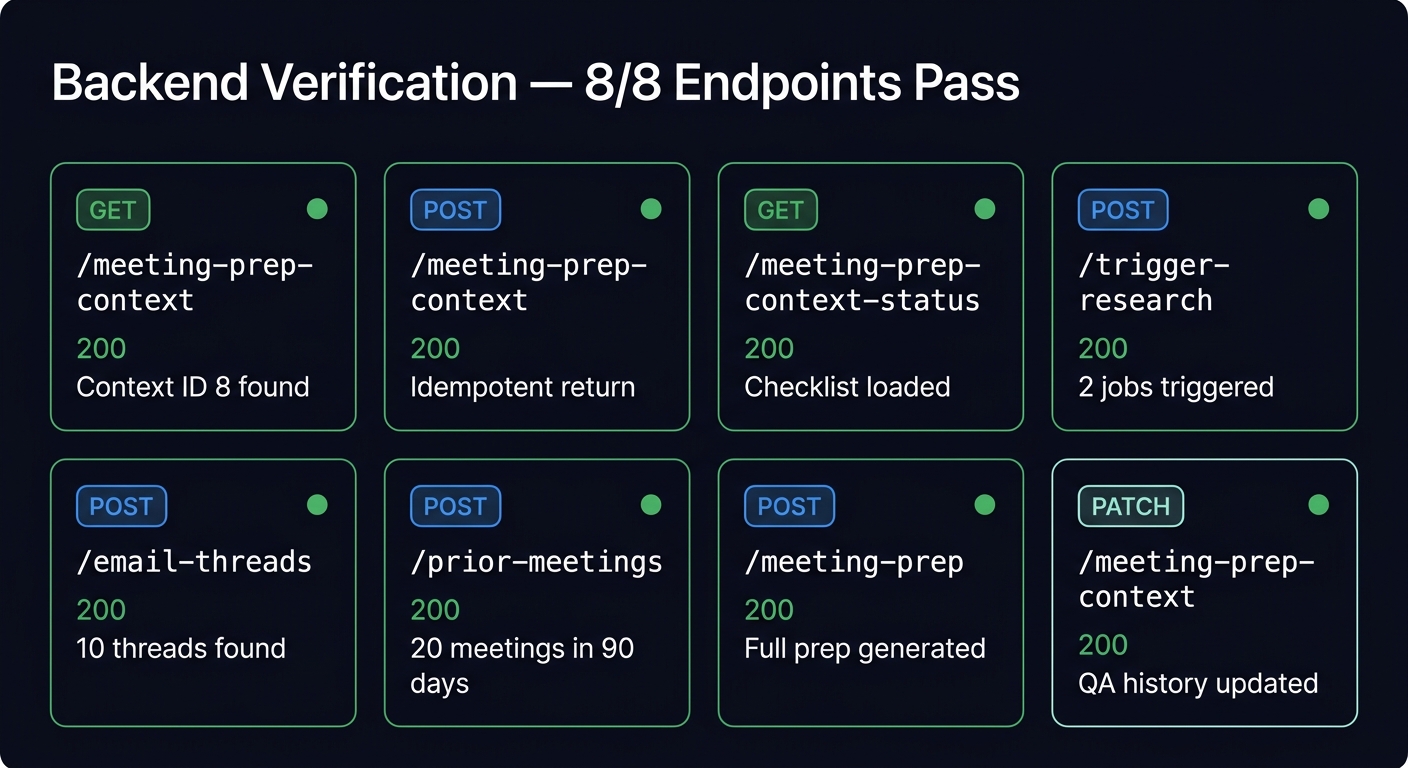
All 8 meeting prep API endpoints curl-tested against live data (Mark/Robert Sync event):
| Endpoint | Status | Result |
|---|---|---|
GET /meeting-prep-context | 200 | Context ID 8, 3 QA entries found |
POST /meeting-prep-context | 200 | Idempotent — returned existing context |
GET /meeting-prep-context-status | 200 | Checklist + deep research job status |
POST /trigger-meeting-prep-research | 200 | 2 jobs triggered (Claude Sonnet 4) |
POST /meeting-prep-email-threads | 200 | 10 email threads found |
POST /meeting-prep-prior-meetings | 200 | 20 prior meetings in 90 days |
POST /meeting-prep | 200 | Full prep generated with injected context |
PATCH /meeting-prep-context | 200 | QA history + desired outcome updated |
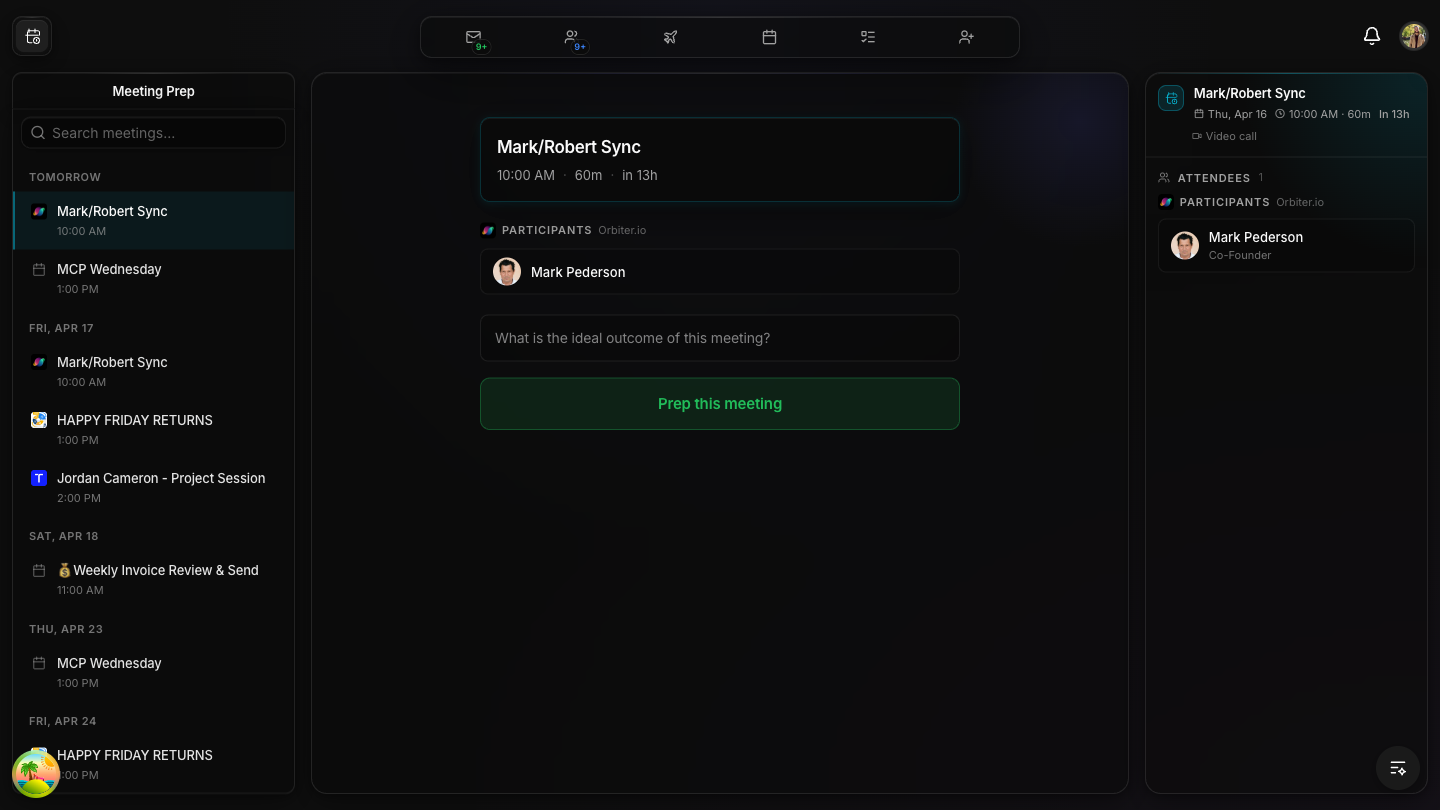
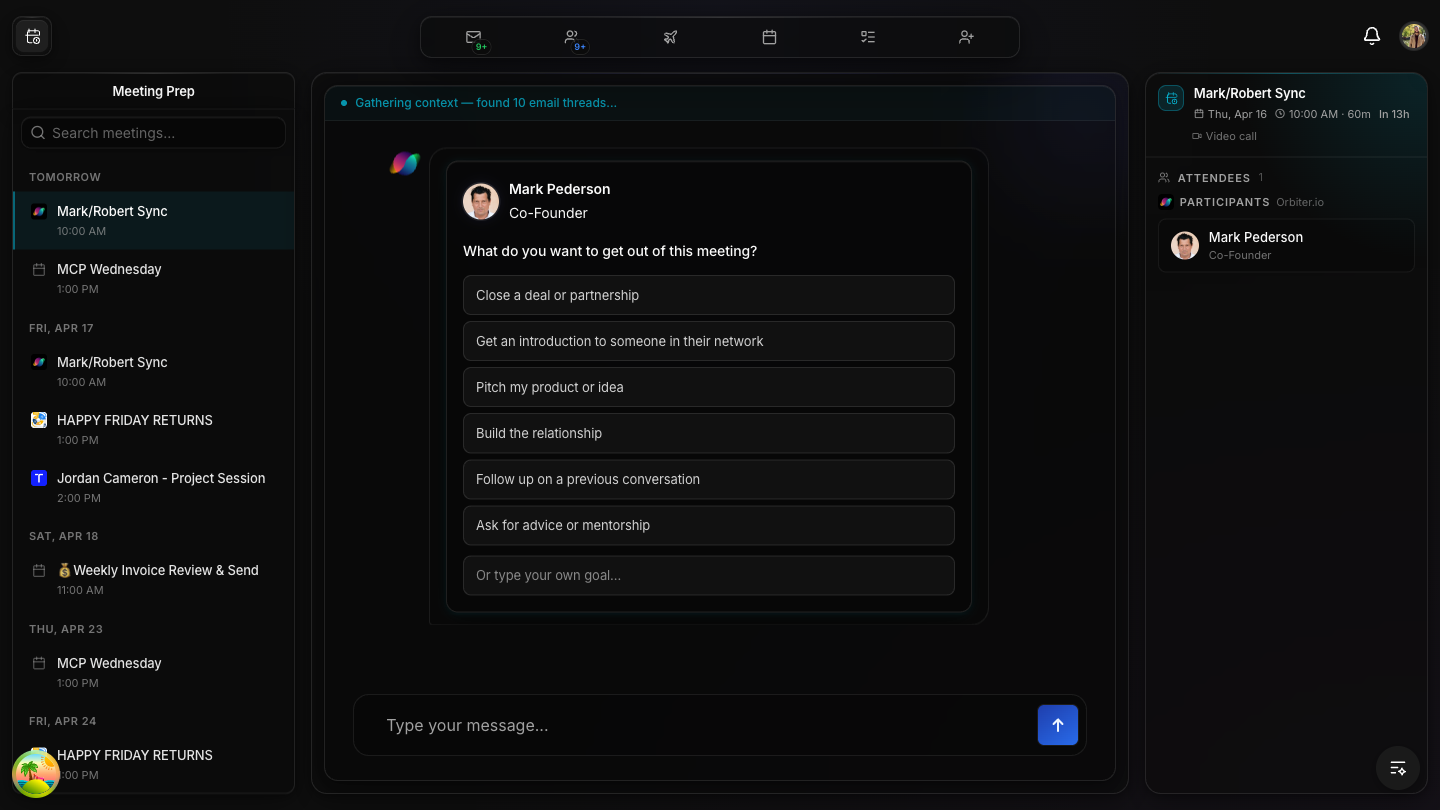
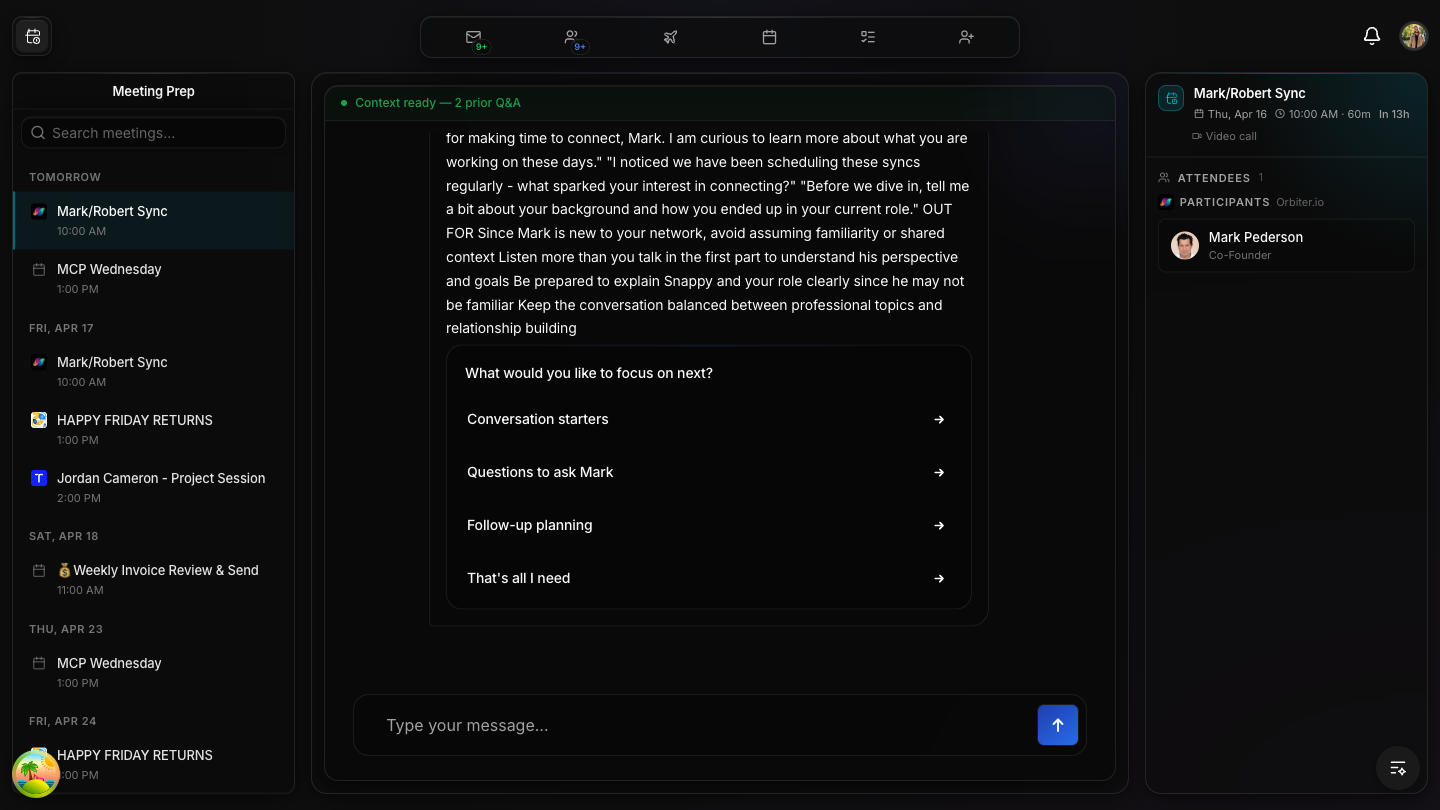
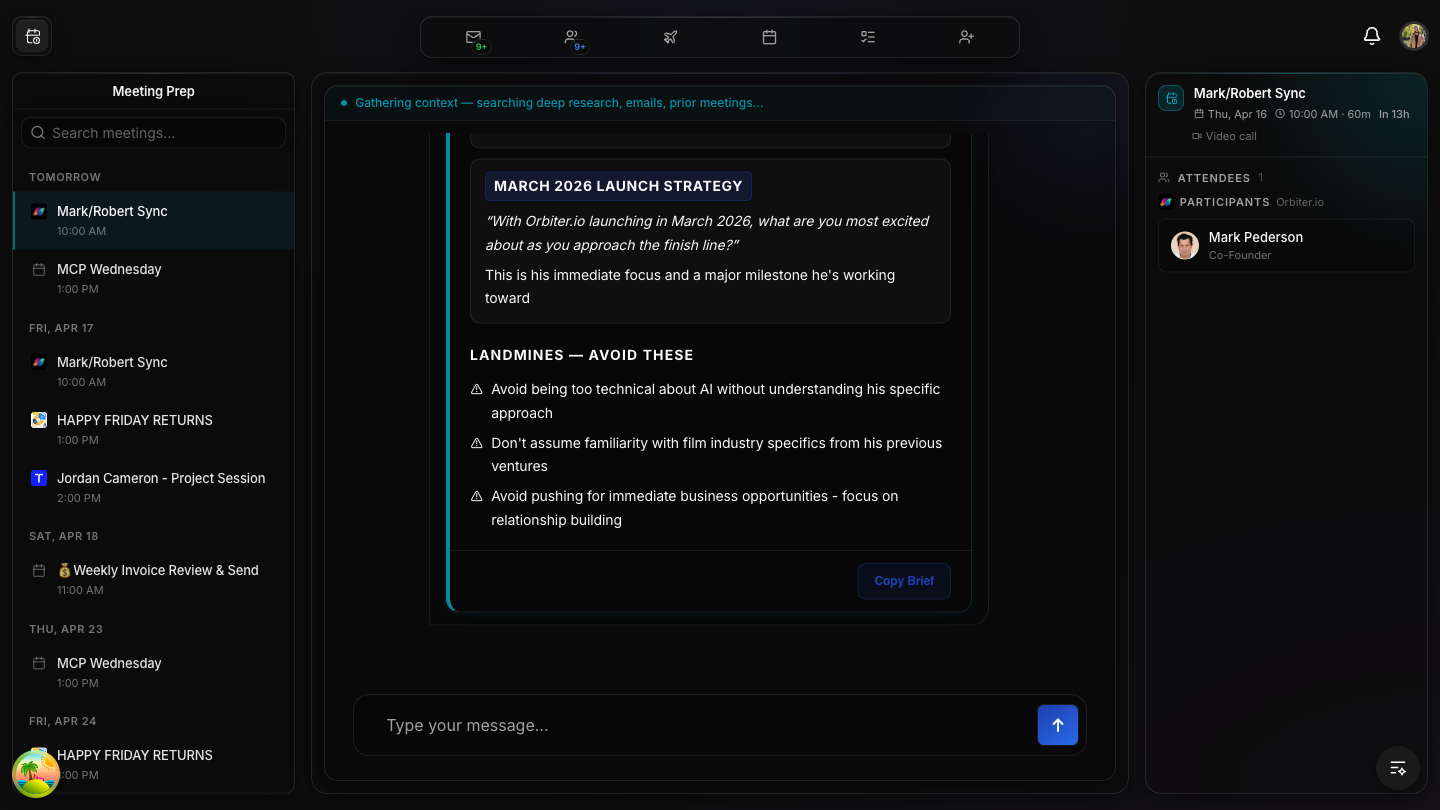
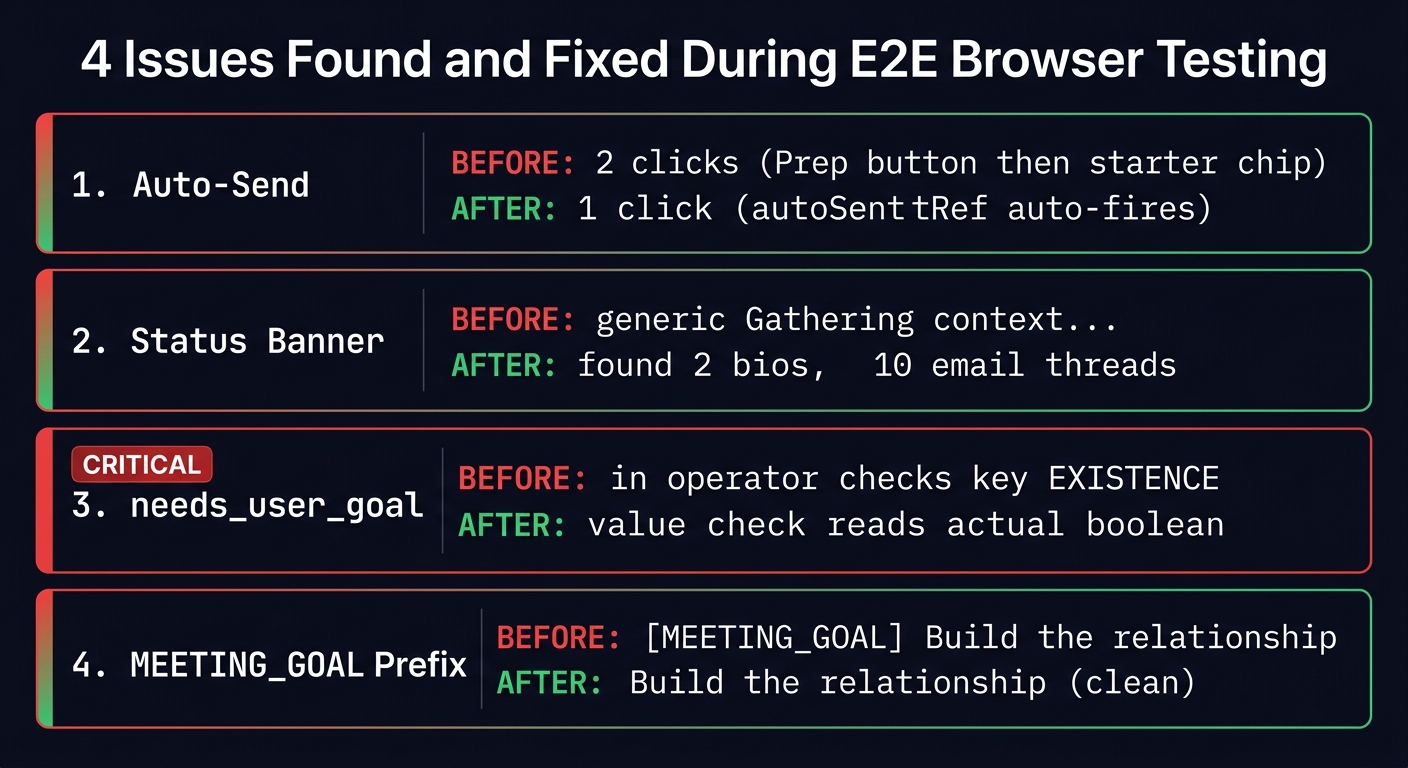
Live E2E testing revealed four UX issues that were invisible during build-time verification. All four were found, fixed, and re-verified in a single session.
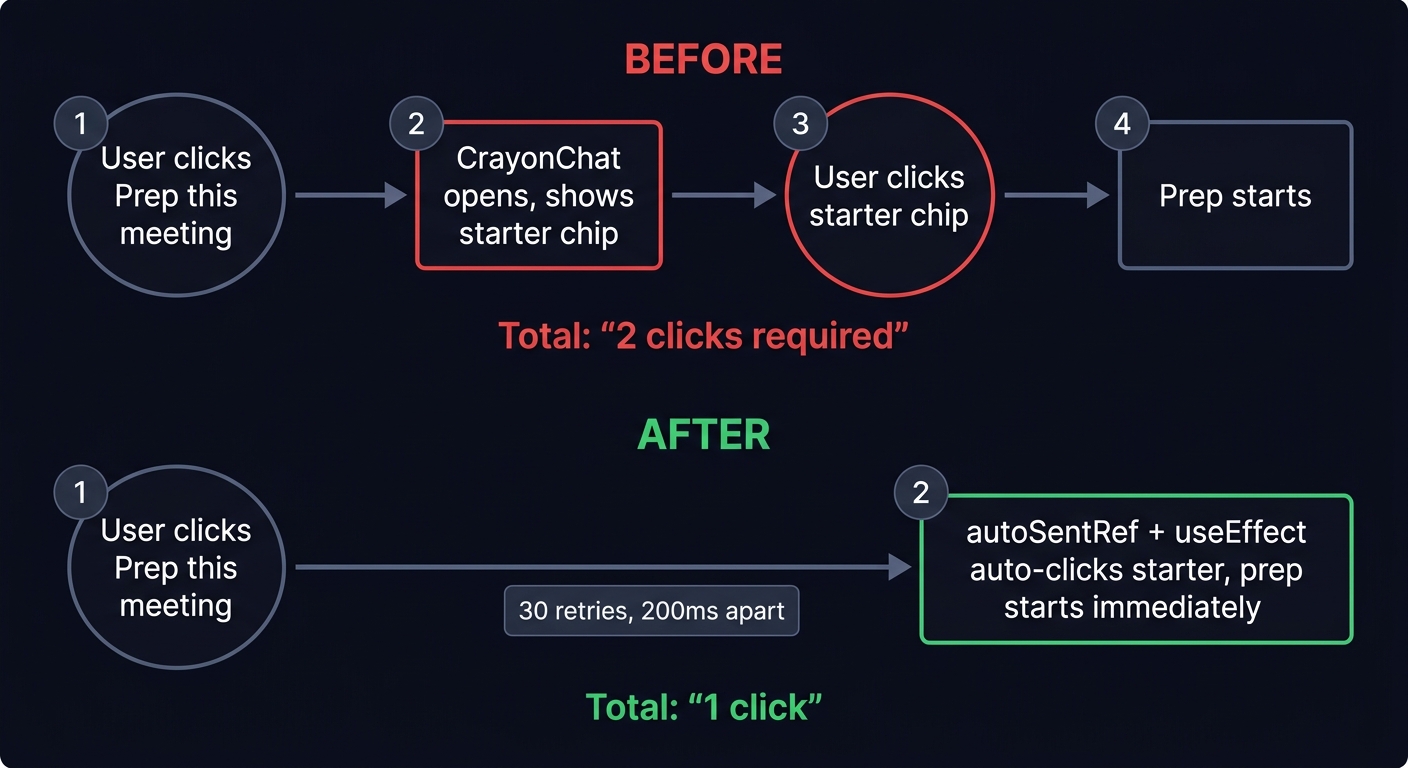
Bug: Clicking “Prep this meeting” opened CrayonChat but only displayed a starter chip. The user had to click the chip again to trigger the actual prep — a confusing double-click UX.
Root cause: CrayonChat conversation starters are clickable chips that require explicit user interaction — they don’t auto-fire.
Fix: Added autoSentRef + a useEffect that polls for the CrayonChat starter button and auto-clicks it when prepStarted becomes true. Retry logic (30 attempts, 200ms apart) handles CrayonChat DOM mount timing.
Bug: Status banner showed generic “Gathering context...” with no indication of what was actually being gathered.
Fix: Banner now reads prepContextRef.current and displays specific counts:
needs_user_goal Value Check CRITICAL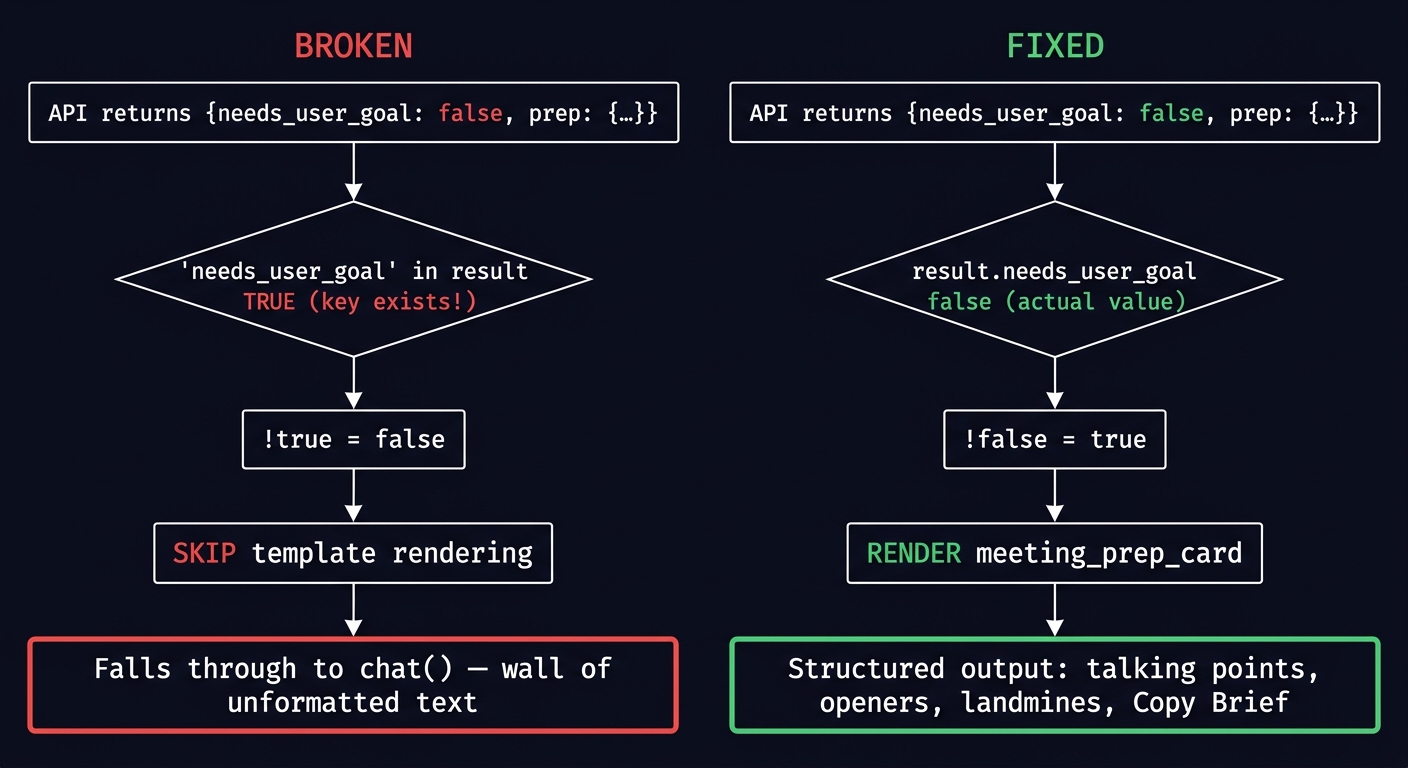
Bug: After selecting a goal, the prep response rendered as a wall of unformatted text instead of a structured meeting_prep_card template with sections and a Copy Brief button.
Root cause: The check !("needs_user_goal" in result) tested key existence, not the value. When the API returned {needs_user_goal: false, prep: {...}}, the in operator returned true (key exists), so the conditional evaluated to false — skipping the template rendering and falling through to general chat().
// BEFORE (broken — checks key existence):
if (!("needs_user_goal" in result)) { /* render meeting_prep_card */ }

// AFTER (correct — checks actual boolean value):
if (!(result as Record<string, unknown>).needs_user_goal) { /* render meeting_prep_card */ }[MEETING_GOAL] prefix removed from UIBug: When a user selected “Build the relationship”, the chat bubble showed [MEETING_GOAL] Build the relationship — leaking an internal routing prefix.
Fix: Goal card sends clean text. Canvas uses meetingGoalPendingRef.current (ref-based state machine) for detection instead of prefix matching.
// BEFORE (meeting-goal-card.tsx):
message: `[MEETING_GOAL] ${goal}`

// AFTER:
message: goal

// Detection moved from prefix matching to ref-based state machine:
// if (prompt.startsWith(MEETING_GOAL_PREFIX)) → if (meetingGoalPendingRef.current)in operator vs value check is a classic JavaScript gotcha that only surfaces during actual API interaction. E2E browser testing is essential for flows that depend on real API responses.